GUI Widget Gallery
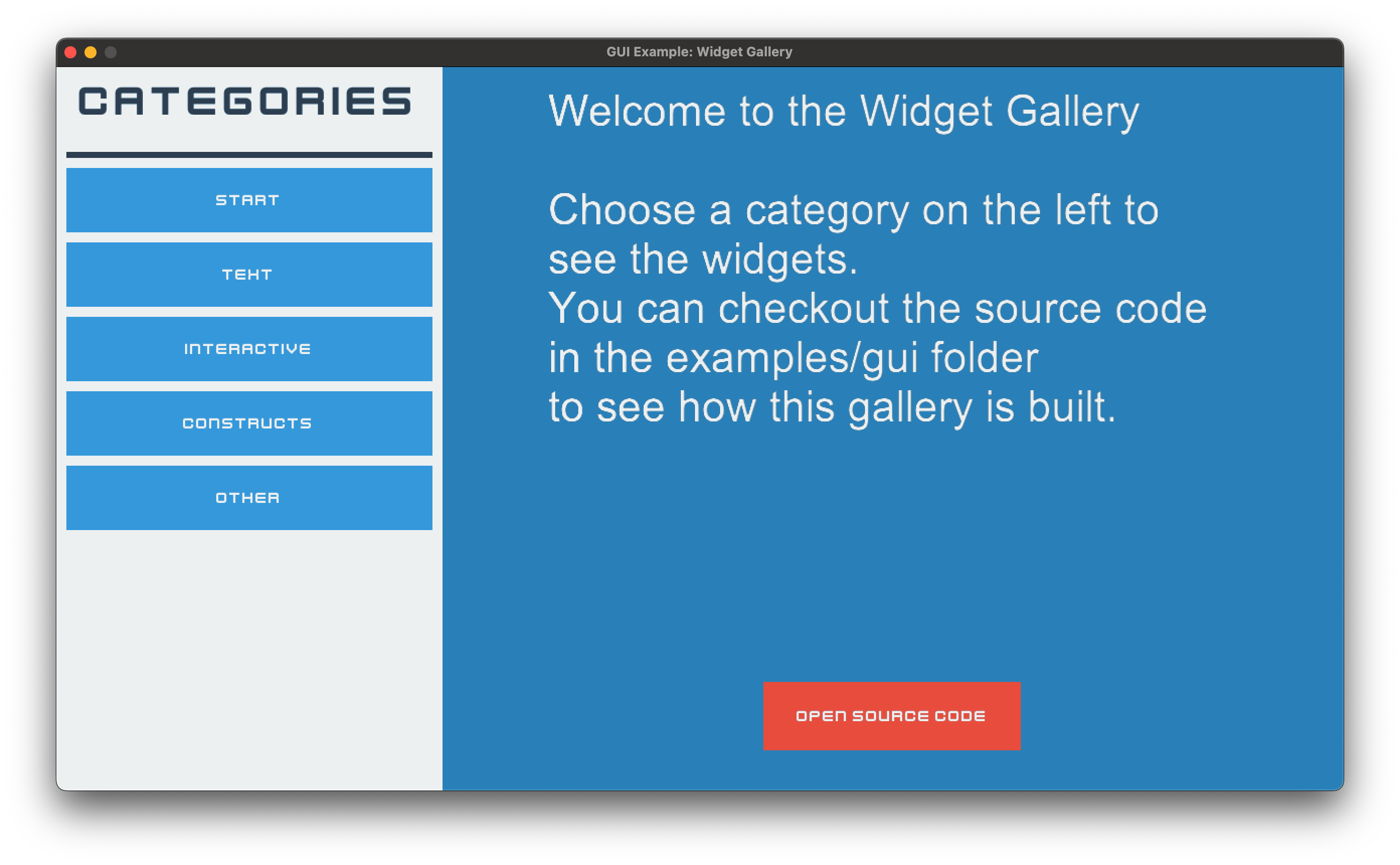
2_widgets.py
  1"""An overview of all included widgets.
  2
  3See the other GUI examples for more indepth information about specific widgets.
  4
  5If Arcade and Python are properly installed, you can run this example with:
  6python -m arcade.examples.gui.2_widgets
  7"""
  8
  9from __future__ import annotations
 10
 11import textwrap
 12from copy import deepcopy
 13
 14import arcade
 15from arcade.gui import (
 16    NinePatchTexture,
 17    UIAnchorLayout,
 18    UIBoxLayout,
 19    UIButtonRow,
 20    UIDropdown,
 21    UIDummy,
 22    UIFlatButton,
 23    UIImage,
 24    UIInputText,
 25    UILabel,
 26    UIManager,
 27    UIMessageBox,
 28    UIOnActionEvent,
 29    UIOnChangeEvent,
 30    UISlider,
 31    UISpace,
 32    UISpriteWidget,
 33    UITextArea,
 34    UITextureButton,
 35    UITextureSlider,
 36    UITextureToggle,
 37    UIView,
 38)
 39
 40# Load system fonts
 41arcade.resources.load_kenney_fonts()
 42
 43DEFAULT_FONT = ("Kenney Future", "arial")
 44DETAILS_FONT = ("arial", "Kenney Future Narrow")
 45
 46# Preload textures, because they are mostly used multiple times, so they are not
 47# loaded multiple times
 48TEX_SCROLL_DOWN = arcade.load_texture(":resources:gui_basic_assets/scroll/indicator_down.png")
 49TEX_SCROLL_UP = arcade.load_texture(":resources:gui_basic_assets/scroll/indicator_up.png")
 50
 51TEX_RED_BUTTON_NORMAL = arcade.load_texture(":resources:gui_basic_assets/button/red_normal.png")
 52TEX_RED_BUTTON_HOVER = arcade.load_texture(":resources:gui_basic_assets/button/red_hover.png")
 53TEX_RED_BUTTON_PRESS = arcade.load_texture(":resources:gui_basic_assets/button/red_press.png")
 54TEX_RED_BUTTON_DISABLE = arcade.load_texture(":resources:gui_basic_assets/button/red_disabled.png")
 55
 56TEX_TOGGLE_RED = arcade.load_texture(":resources:gui_basic_assets/toggle/red.png")
 57TEX_TOGGLE_GREEN = arcade.load_texture(":resources:gui_basic_assets/toggle/green.png")
 58
 59TEX_CHECKBOX_CHECKED = arcade.load_texture(":resources:gui_basic_assets/checkbox/blue_check.png")
 60TEX_CHECKBOX_UNCHECKED = arcade.load_texture(":resources:gui_basic_assets/checkbox/empty.png")
 61
 62TEX_SLIDER_THUMB_BLUE = arcade.load_texture(":resources:gui_basic_assets/slider/thumb_blue.png")
 63TEX_SLIDER_TRACK_BLUE = arcade.load_texture(":resources:gui_basic_assets/slider/track_blue.png")
 64TEX_SLIDER_THUMB_RED = arcade.load_texture(":resources:gui_basic_assets/slider/thumb_red.png")
 65TEX_SLIDER_TRACK_RED = arcade.load_texture(":resources:gui_basic_assets/slider/track_red.png")
 66TEX_SLIDER_THUMB_GREEN = arcade.load_texture(":resources:gui_basic_assets/slider/thumb_green.png")
 67TEX_SLIDER_TRACK_GREEN = arcade.load_texture(":resources:gui_basic_assets/slider/track_green.png")
 68
 69TEX_NINEPATCH_BASE = arcade.load_texture(":resources:gui_basic_assets/window/grey_panel.png")
 70
 71TEX_ARCADE_LOGO = arcade.load_texture(":resources:/logo.png")
 72
 73# Load animation for the sprite widget
 74frame_textures = []
 75for i in range(8):
 76    tex = arcade.load_texture(
 77        f":resources:images/animated_characters/female_adventurer/femaleAdventurer_walk{i}.png"
 78    )
 79    frame_textures.append(tex)
 80
 81TEX_ANIMATED_CHARACTER = arcade.TextureAnimation(
 82    [arcade.TextureKeyframe(frame) for frame in frame_textures]
 83)
 84
 85TEXT_WIDGET_EXPLANATION = textwrap.dedent("""
 86Arcade GUI provides three types of text widgets:
 87
 88
 89- {bold True}UILabel{bold False}:
 90A simple text widget that can be used to display text.
 91
 92- {bold True}UIInputText{bold False}:
 93A text widget that can be used to get text input from the user.
 94
 95- {bold True}UITextArea{bold False}:
 96A text widget that can be used to display text that is too long for a label.
 97
 98
 99This example shows how to use all three types of text widgets.
100
101
102A few hints regarding the usage of the text widgets:
103
104
105{bold True}UILabel{bold False}:
106
107If you want to display frequently changing text,
108setting a background color will improve performance.
109
110
111{bold True}UIInputText{bold False}:
112
113UIInputText dispatches an event on_change, when the text changes.
114
115
116{bold True}UITextArea{bold False}:
117
118While the widget supports scrolling, there is no scrollbar provided yet.
119Users might oversee content.
120
121In addition UITextArea supports different text styles,
122which relate to Pyglet FormattedDocument.
123
124"PLAIN" - Plain text.
125
126"ATTRIBUTED" - Attributed text following the Pyglet attributed text style.
127
128"HTML" - Allows to use HTML tags for formatting.
129
130""").strip()
131
132
133class ScrollableTextArea(UITextArea, UIAnchorLayout):
134    """This widget is a text area that can be scrolled, like a UITextLayout, but shows indicator,
135    that the text can be scrolled."""
136
137    def __init__(self, **kwargs):
138        super().__init__(**kwargs)
139
140        indicator_size = 22
141        self._down_indicator = UIImage(
142            texture=TEX_SCROLL_DOWN, size_hint=None, width=indicator_size, height=indicator_size
143        )
144        self._down_indicator.visible = False
145        self.add(self._down_indicator, anchor_x="right", anchor_y="bottom", align_x=3)
146
147        self._up_indicator = UIImage(
148            texture=TEX_SCROLL_UP, size_hint=None, width=indicator_size, height=indicator_size
149        )
150        self._up_indicator.visible = False
151        self.add(self._up_indicator, anchor_x="right", anchor_y="top", align_x=3)
152
153    def on_update(self, dt):
154        self._up_indicator.visible = self.layout.view_y < 0
155        self._down_indicator.visible = (
156            abs(self.layout.view_y) < self.layout.content_height - self.layout.height
157        )
158
159
160class GalleryView(UIView):
161    def __init__(self):
162        super().__init__()
163        self.background_color = arcade.uicolor.BLUE_BELIZE_HOLE
164
165        root = self.add_widget(UIAnchorLayout())
166
167        # Setup side navigation
168        nav_side = UIButtonRow(vertical=True, size_hint=(0.3, 1))
169        nav_side.add(
170            UILabel(
171                "Categories",
172                font_name=DEFAULT_FONT,
173                font_size=32,
174                text_color=arcade.uicolor.DARK_BLUE_MIDNIGHT_BLUE,
175                size_hint=(1, 0.1),
176                align="center",
177            )
178        )
179        nav_side.add(UISpace(size_hint=(1, 0.01), color=arcade.uicolor.DARK_BLUE_MIDNIGHT_BLUE))
180
181        nav_side.with_padding(all=10)
182        nav_side.with_background(color=arcade.uicolor.WHITE_CLOUDS)
183        nav_side.add_button("Start", style=UIFlatButton.STYLE_BLUE, size_hint=(1, 0.1))
184        nav_side.add_button("Text", style=UIFlatButton.STYLE_BLUE, size_hint=(1, 0.1))
185        nav_side.add_button("Interactive", style=UIFlatButton.STYLE_BLUE, size_hint=(1, 0.1))
186        nav_side.add_button("Constructs", style=UIFlatButton.STYLE_BLUE, size_hint=(1, 0.1))
187        nav_side.add_button("Other", style=UIFlatButton.STYLE_BLUE, size_hint=(1, 0.1))
188        root.add(nav_side, anchor_x="left", anchor_y="top")
189
190        @nav_side.event("on_action")
191        def on_action(event: UIOnActionEvent):
192            if event.action == "Start":
193                self._show_start_widgets()
194            elif event.action == "Text":
195                self._show_text_widgets()
196            elif event.action == "Interactive":
197                self._show_interactive_widgets()
198            elif event.action == "Constructs":
199                self._show_construct_widgets()
200            elif event.action == "Other":
201                self._show_other_widgets()
202
203        # Setup content to show widgets in
204
205        self._body = UIAnchorLayout(size_hint=(0.7, 1))
206        self._body.with_padding(all=20)
207        root.add(self._body, anchor_x="right", anchor_y="top")
208
209        # init start widgets
210        self._show_start_widgets()
211
212    def _show_start_widgets(self):
213        """Show a short introduction message."""
214        self._body.clear()
215        self._body.add(
216            UITextArea(
217                text=textwrap.dedent("""
218                Welcome to the Widget Gallery
219
220                Choose a category on the left to see the widgets.
221                You can checkout the source code in the examples/gui folder
222                to see how this gallery is built.
223                """).strip(),
224                font_name=DETAILS_FONT,
225                font_size=32,
226                text_color=arcade.uicolor.WHITE,
227                size_hint=(0.8, 0.8),
228            ),
229            anchor_y="top",
230        )
231        open_sourcecode = self._body.add(
232            UIFlatButton(
233                text="Open Source Code", style=UIFlatButton.STYLE_RED, size_hint=(0.3, 0.1)
234            ),
235            anchor_y="bottom",
236            align_y=20,
237        )
238
239        @open_sourcecode.event("on_click")
240        def on_click(_):
241            """This will open the source code of this example on GitHub."""
242            import webbrowser
243
244            webbrowser.open(
245                "https://github.com/pythonarcade/arcade/tree/development/arcade/examples/gui"
246            )
247
248    def _show_text_widgets(self):
249        """Show the text widgets.
250
251        For this we clear the body and add the text widgets.
252
253        Featuring:
254        - UILabel
255        - UIInputText
256        - UITextArea
257        """
258
259        self._body.clear()
260
261        box = UIBoxLayout(vertical=True, size_hint=(1, 1), align="left")
262        self._body.add(box)
263        box.add(UILabel("Text Widgets", font_name=DEFAULT_FONT, font_size=32))
264        box.add(UISpace(size_hint=(1, 0.1)))
265
266        row_1 = UIBoxLayout(vertical=False, size_hint=(1, 0.1))
267        box.add(row_1)
268        row_1.add(UILabel("Name: ", font_name=DEFAULT_FONT, font_size=24))
269        name_input = row_1.add(
270            UIInputText(
271                width=400,
272                height=40,
273                font_name=DEFAULT_FONT,
274                font_size=24,
275                border_color=arcade.uicolor.GRAY_CONCRETE,
276                border_width=2,
277            )
278        )
279        welcome_label = box.add(
280            UILabel("Nice to meet you ''", font_name=DEFAULT_FONT, font_size=24)
281        )
282
283        @name_input.event("on_change")
284        def on_text_change(event: UIOnChangeEvent):
285            welcome_label.text = f"Nice to meet you `{event.new_value}`"
286
287        box.add(UISpace(size_hint=(1, 0.3)))  # Fill some of the left space
288
289        text_area = box.add(
290            ScrollableTextArea(
291                text=TEXT_WIDGET_EXPLANATION,
292                size_hint=(1, 0.9),
293                font_name=DETAILS_FONT,
294                font_size=16,
295                text_color=arcade.uicolor.WHITE,
296                document_mode="ATTRIBUTED",
297            )
298        )
299        text_area.with_padding(left=10, right=10)
300        text_area.with_border(color=arcade.uicolor.GRAY_CONCRETE, width=2)
301
302    def _show_interactive_widgets(self):
303        self._body.clear()
304        box = UIBoxLayout(vertical=True, size_hint=(1, 1), align="left", space_between=10)
305        self._body.add(box)
306        box.add(UILabel("Interactive Widgets", font_name=DEFAULT_FONT, font_size=32))
307        box.add(UISpace(size_hint=(1, 0.1)))
308
309        flat_row = UIBoxLayout(vertical=False, size_hint=(1, 0.1), space_between=10)
310        box.add(flat_row)
311
312        flat_row.add(
313            UIFlatButton(
314                text="UIFlatButton blue", style=UIFlatButton.STYLE_BLUE, size_hint=(0.3, 1)
315            )
316        )
317        flat_row.add(
318            UIFlatButton(text="UIFlatButton red", style=UIFlatButton.STYLE_RED, size_hint=(0.3, 1))
319        )
320        flat_row.add(
321            UIFlatButton(text="disabled", style=UIFlatButton.STYLE_BLUE, size_hint=(0.3, 1))
322        ).disabled = True
323
324        tex_row = UIBoxLayout(vertical=False, size_hint=(1, 0.1), space_between=10)
325        box.add(tex_row)
326        tex_row.add(
327            UITextureButton(
328                text="UITextureButton",
329                texture=TEX_RED_BUTTON_NORMAL,
330                texture_hovered=TEX_RED_BUTTON_HOVER,
331                texture_pressed=TEX_RED_BUTTON_PRESS,
332                texture_disabled=TEX_RED_BUTTON_DISABLE,
333                size_hint=(0.3, 1),
334            )
335        )
336
337        tex_row.add(UISpace(size_hint=(0.3, 1)))
338
339        tex_row.add(
340            UITextureButton(
341                text="disabled",
342                texture=TEX_RED_BUTTON_NORMAL,
343                texture_hovered=TEX_RED_BUTTON_HOVER,
344                texture_pressed=TEX_RED_BUTTON_PRESS,
345                texture_disabled=TEX_RED_BUTTON_DISABLE,
346                size_hint=(0.3, 1),
347            )
348        ).disabled = True
349
350        toggle_row = UIBoxLayout(vertical=False, size_hint=(1, 0.1), space_between=10)
351        box.add(toggle_row)
352        toggle_row.add(
353            UILabel("UITextureToggle", font_name=DETAILS_FONT, font_size=16, size_hint=(0.3, 0))
354        )
355        toggle_row.add(
356            UITextureToggle(
357                on_texture=TEX_TOGGLE_RED,
358                off_texture=TEX_TOGGLE_GREEN,
359                width=64,
360                height=32,
361            )
362        )
363        toggle_row.add(
364            UITextureToggle(
365                on_texture=TEX_CHECKBOX_CHECKED,
366                off_texture=TEX_CHECKBOX_UNCHECKED,
367                width=32,
368                height=32,
369            )
370        )
371
372        dropdown_row = UIBoxLayout(vertical=False, size_hint=(1, 0.1), space_between=10)
373        box.add(dropdown_row)
374        dropdown_row.add(
375            UILabel("UIDropdown", font_name=DETAILS_FONT, font_size=16, size_hint=(0.3, 0))
376        )
377        dropdown_row.add(
378            UIDropdown(
379                default="Option 1",
380                options=["Option 1", "Option 2", "Option 3"],
381            )
382        )
383
384        slider_row = UIBoxLayout(vertical=False, size_hint=(1, 0.1), space_between=10)
385        box.add(slider_row)
386
387        slider_row.add(
388            UILabel(
389                "UISlider",
390                font_name=DETAILS_FONT,
391                font_size=16,
392                size_hint=(0.3, 0),
393            )
394        )
395        slider_row.add(
396            UISlider(
397                size_hint=(0.2, None),
398            )
399        )
400
401        tex_slider_row = UIBoxLayout(vertical=False, size_hint=(1, 0.1), space_between=10)
402        box.add(tex_slider_row)
403
404        tex_slider_row.add(
405            UILabel(
406                "UITextureSlider",
407                font_name=DETAILS_FONT,
408                font_size=16,
409                size_hint=(0.3, 0),
410            )
411        )
412
413        s1 = tex_slider_row.add(
414            UITextureSlider(
415                thumb_texture=TEX_SLIDER_THUMB_BLUE,
416                track_texture=NinePatchTexture(10, 10, 10, 10, TEX_SLIDER_TRACK_BLUE),
417                size_hint=(0.3, None),
418            )
419        )
420
421        green_style = deepcopy(UITextureSlider.DEFAULT_STYLE)
422        green_style["normal"].filled_track = arcade.uicolor.GREEN_GREEN_SEA
423        green_style["hover"].filled_track = arcade.uicolor.GREEN_EMERALD
424        green_style["press"].filled_track = arcade.uicolor.GREEN_GREEN_SEA
425        s2 = tex_slider_row.add(
426            UITextureSlider(
427                thumb_texture=TEX_SLIDER_THUMB_GREEN,
428                track_texture=NinePatchTexture(10, 10, 10, 10, TEX_SLIDER_TRACK_GREEN),
429                size_hint=(0.3, None),
430                style=green_style,
431            )
432        )
433
434        red_style = deepcopy(UITextureSlider.DEFAULT_STYLE)
435        red_style["normal"].filled_track = arcade.uicolor.RED_POMEGRANATE
436        red_style["hover"].filled_track = arcade.uicolor.RED_ALIZARIN
437        red_style["press"].filled_track = arcade.uicolor.RED_POMEGRANATE
438        s3 = tex_slider_row.add(
439            UITextureSlider(
440                thumb_texture=TEX_SLIDER_THUMB_RED,
441                track_texture=NinePatchTexture(10, 10, 10, 10, TEX_SLIDER_TRACK_RED),
442                size_hint=(0.3, None),
443                style=red_style,
444            )
445        )
446
447        @s1.event("on_change")
448        def _(event: UIOnChangeEvent):
449            s2.value = event.new_value
450            s3.value = event.new_value
451
452        @s2.event("on_change")
453        def _(event: UIOnChangeEvent):
454            s1.value = event.new_value
455            s3.value = event.new_value
456
457        @s3.event("on_change")
458        def _(event: UIOnChangeEvent):
459            s1.value = event.new_value
460            s2.value = event.new_value
461
462        box.add(UISpace(size_hint=(0.2, 0.1)))
463        text_area = box.add(
464            UITextArea(
465                text=textwrap.dedent("""
466                        Interactive widgets are widgets that the user can interact with.
467                        This includes buttons, toggles, sliders and more.
468
469                        By subclassing UIInteractiveWidget you
470                        can create your own interactive widgets.
471
472                        For text input have a look at the text widgets.
473                    """).strip(),
474                font_name=DETAILS_FONT,
475                font_size=16,
476                text_color=arcade.uicolor.WHITE,
477                size_hint=(1, 0.9),
478            )
479        )
480        text_area.with_padding(left=10, right=10)
481        text_area.with_border(color=arcade.uicolor.GRAY_CONCRETE, width=2)
482
483    def _show_construct_widgets(self):
484        self._body.clear()
485        box = UIBoxLayout(vertical=True, size_hint=(1, 1), align="left", space_between=10)
486        self._body.add(box)
487        box.add(UILabel("Constructs", font_name=DEFAULT_FONT, font_size=32))
488        box.add(UISpace(size_hint=(1, 0.1)))
489
490        message_row = UIBoxLayout(vertical=False, size_hint=(1, 0.1), space_between=10)
491        box.add(message_row)
492        message_row.add(
493            UILabel(
494                "UIMessageBox",
495                font_name=DETAILS_FONT,
496                font_size=16,
497                size_hint=(0.3, 0),
498            )
499        )
500        message_button = message_row.add(
501            UIFlatButton(
502                text="Show Message",
503                style=UIFlatButton.STYLE_BLUE,
504                size_hint=(0.3, 1),
505            )
506        )
507
508        @message_button.event("on_click")
509        def on_click(event):
510            self.ui.add(
511                UIMessageBox(
512                    width=500,
513                    height=350,
514                    title="Message Box",
515                    buttons=("Ok", "Cancel"),
516                    message_text=textwrap.dedent("""
517                    This is a message box.
518                    It can be used to show messages to the user.
519
520                    You can add buttons to it, to let the user choose an action.
521                    """).strip(),
522                ),
523                layer=UIManager.OVERLAY_LAYER,
524            )
525
526        button_row = UIBoxLayout(vertical=False, size_hint=(1, 0.1), space_between=10)
527        box.add(button_row)
528        button_row.add(
529            UILabel(
530                "UIButtonRow",
531                font_name=DETAILS_FONT,
532                font_size=16,
533                size_hint=(0.3, 0),
534            )
535        )
536        buttons = button_row.add(
537            UIButtonRow(
538                text="Show Message",
539                style=UIFlatButton.STYLE_BLUE,
540                size_hint=(1, 0),
541            )
542        )
543        buttons.add_button("Default Style", size_hint=(1, None))
544        buttons.add_button("Red Style", style=UIFlatButton.STYLE_RED, size_hint=(1, None))
545        buttons.add_button("Blue Style", style=UIFlatButton.STYLE_BLUE, size_hint=(1, None))
546
547        # Constructs
548        # "UIButtonRow",
549
550        box.add(UISpace(size_hint=(0.2, 0.1)))
551        text_area = box.add(
552            UITextArea(
553                text=textwrap.dedent("""
554            Constructs are widgets that combine multiple widgets, to provide common functionality
555            within a simple widget.
556            Examples for this are message boxes or rows of buttons.
557            """).strip(),
558                font_name=DETAILS_FONT,
559                font_size=16,
560                text_color=arcade.uicolor.WHITE,
561                size_hint=(1, 0.5),
562            )
563        )
564        text_area.with_padding(left=10, right=10)
565        text_area.with_border(color=arcade.uicolor.GRAY_CONCRETE, width=2)
566
567    def _show_other_widgets(self):
568        self._body.clear()
569        box = UIBoxLayout(vertical=True, size_hint=(1, 1), align="left", space_between=10)
570        self._body.add(box)
571        box.add(UILabel("Other Widgets", font_name=DEFAULT_FONT, font_size=32))
572        box.add(UISpace(size_hint=(1, 0.1)))
573
574        image_row = box.add(UIBoxLayout(vertical=False, size_hint=(1, 0.1)))
575        image_row.add(UILabel("UIImage", font_name=DETAILS_FONT, font_size=16, size_hint=(0.3, 0)))
576        image_row.add(UIImage(texture=TEX_ARCADE_LOGO, width=64, height=64))
577
578        dummy_row = box.add(UIBoxLayout(vertical=False, size_hint=(1, 0.1)))
579        dummy_row.add(UILabel("UIDummy", font_name=DETAILS_FONT, font_size=16, size_hint=(0.3, 0)))
580        dummy_row.add(UIDummy(size_hint=(0.2, 1)))
581        dummy_row.add(UIDummy(size_hint=(0.2, 1)))
582        dummy_row.add(UIDummy(size_hint=(0.2, 1)))
583
584        sprite = arcade.TextureAnimationSprite(animation=TEX_ANIMATED_CHARACTER)
585        sprite.scale = 0.5
586        sprite_row = box.add(UIBoxLayout(vertical=False, size_hint=(1, 0.1)))
587        sprite_row.add(
588            UILabel("UISpriteWidget", font_name=DETAILS_FONT, font_size=16, size_hint=(0.3, 0))
589        )
590        sprite_row.add(UISpriteWidget(sprite=sprite, width=sprite.width, height=sprite.height))
591
592        box.add(UISpace(size_hint=(0.2, 0.1)))
593        text_area = box.add(
594            UITextArea(
595                text=textwrap.dedent("""
596                    Arcade GUI provides also a few more widgets for special use cases.
597
598                    - UIImage: A widget to display an image.
599                    - UIDummy: Which can be used as a placeholder.
600                                It renders a random color and changes it on click.
601                    - UISpace: A widget that only takes up space.
602                                But can also be used to add a colored space.
603                    - UISpriteWidget: A widget that can display a sprite.
604
605                    """).strip(),
606                font_name=DETAILS_FONT,
607                font_size=16,
608                text_color=arcade.uicolor.WHITE,
609                size_hint=(1, 0.9),
610            )
611        )
612        text_area.with_padding(left=10, right=10)
613        text_area.with_border(color=arcade.uicolor.GRAY_CONCRETE, width=2)
614
615
616def main():
617    window = arcade.Window(title="GUI Example: Widget Gallery")
618    window.show_view(GalleryView())
619    window.run()
620
621
622if __name__ == "__main__":
623    main()