Depth of Field Blur
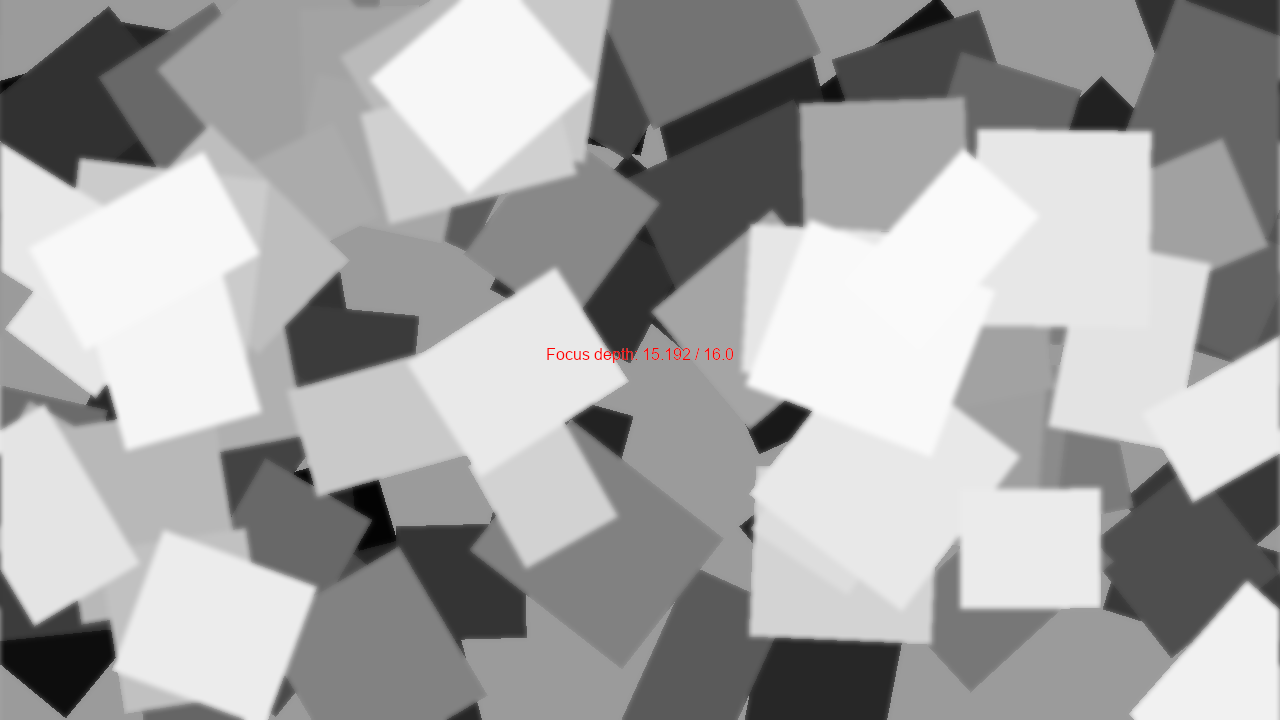
depth_of_field.py
  1"""An experimental depth-of-field example.
  2
  3It uses the depth attribute of along with blurring and shaders to
  4roughly approximate depth-based blur effects. The focus bounces
  5back forth automatically between a maximum and minimum depth value
  6based on time. Change the speed and focus via either the constants
  7at the top of the file or the arguments passed to it at the bottom of
  8the file.
  9
 10This example works by doing the following for each frame:
 11
 121. Render a depth value for pixel into a buffer
 132. Render a gaussian blurred version of the scene
 143. For each pixel, use the current depth value to lerp between the
 15   blurred and un-blurred versions of the scene.
 16
 17This is more expensive than rendering the scene directly, but it's
 18both easier and more performant than more accurate blur approaches.
 19
 20If Python and Arcade are installed, this example can be run from the command line with:
 21python -m arcade.examples.depth_of_field
 22"""
 23
 24from contextlib import contextmanager
 25from math import cos, pi
 26from random import randint, uniform
 27from textwrap import dedent
 28from typing import cast
 29
 30from pyglet.graphics import Batch
 31
 32import arcade
 33from arcade import get_window, SpriteList, SpriteSolidColor, Text, Window, View
 34from arcade.camera.data_types import DEFAULT_NEAR_ORTHO, DEFAULT_FAR
 35from arcade.color import RED
 36from arcade.experimental.postprocessing import GaussianBlur
 37from arcade.gl import NEAREST, Program, Texture2D, geometry
 38from arcade.types import RGBA255, Color
 39
 40WINDOW_TITLE = "Depth of Field Example"
 41
 42WINDOW_WIDTH = 1280
 43WINDOW_HEIGHT = 720
 44BACKGROUND_GRAY = Color(155, 155, 155, 255)
 45
 46
 47class DepthOfField:
 48    """A depth-of-field effect we can use as a render context manager.
 49
 50    Args:
 51        size:
 52            The size of the buffers.
 53        clear_color:
 54            The color which will be used as the background.
 55    """
 56
 57    def __init__(
 58        self,
 59        size: tuple[int, int] | None = None,
 60        clear_color: RGBA255 = BACKGROUND_GRAY
 61    ):
 62        self._geo = geometry.quad_2d_fs()
 63        self._win: Window = get_window()
 64
 65        size = cast(tuple[int, int], size or self._win.size)
 66        self._clear_color: Color = Color.from_iterable(clear_color)
 67
 68        self.stale = True
 69
 70        # Set up our depth buffer to hold per-pixel depth
 71        self._render_target = self._win.ctx.framebuffer(
 72            color_attachments=[
 73                self._win.ctx.texture(
 74                    size,
 75                    components=4,
 76                    filter=(NEAREST, NEAREST),
 77                    wrap_x=self._win.ctx.REPEAT,
 78                    wrap_y=self._win.ctx.REPEAT,
 79                ),
 80            ],
 81            depth_attachment=self._win.ctx.depth_texture(size),
 82        )
 83
 84        # Set up everything we need to perform blur and store results.
 85        # This includes the blur effect, a framebuffer, and an instance
 86        # variable to store the returned texture holding blur results.
 87        self._blur_process = GaussianBlur(size, kernel_size=10, sigma=2.0, multiplier=2.0, step=4)
 88        self._blur_target = self._win.ctx.framebuffer(
 89            color_attachments=[
 90                self._win.ctx.texture(
 91                    size,
 92                    components=4,
 93                    filter=(NEAREST, NEAREST),
 94                    wrap_x=self._win.ctx.REPEAT,
 95                    wrap_y=self._win.ctx.REPEAT,
 96                )
 97            ]
 98        )
 99        self._blurred: Texture2D | None = None
100
101        # To keep this example in one file, we use strings for our
102        # our shaders. You may want to use pathlib.Path.read_text in
103        # your own code instead.
104        self._render_program = self._win.ctx.program(
105            vertex_shader=dedent(
106                """#version 330
107
108                in vec2 in_vert;
109                in vec2 in_uv;
110
111                out vec2 out_uv;
112
113                void main(){
114                   gl_Position = vec4(in_vert, 0.0, 1.0);
115                   out_uv = in_uv;
116                }"""
117            ),
118            fragment_shader=dedent(
119                """#version 330
120
121                uniform sampler2D texture_0;
122                uniform sampler2D texture_1;
123                uniform sampler2D depth_0;
124
125                uniform float focus_depth;
126
127                in vec2 out_uv;
128
129                out vec4 frag_colour;
130
131                void main() {
132                   float depth_val = texture(depth_0, out_uv).x;
133                   float depth_adjusted = min(1.0, 2.0 * abs(depth_val - focus_depth));
134                   vec4 crisp_tex = texture(texture_0, out_uv);
135                   vec3 blur_tex = texture(texture_1, out_uv).rgb;
136                   frag_colour = mix(crisp_tex, vec4(blur_tex, crisp_tex.a), depth_adjusted);
137                   //if (depth_adjusted < 0.1){frag_colour = vec4(1.0, 0.0, 0.0, 1.0);}
138                }"""
139            ),
140        )
141
142        # Set the buffers the shader program will use
143        self._render_program["texture_0"] = 0
144        self._render_program["texture_1"] = 1
145        self._render_program["depth_0"] = 2
146
147    @property
148    def render_program(self) -> Program:
149        """The compiled shader for this effect."""
150        return self._render_program
151
152    @contextmanager
153    def draw_into(self):
154        self.stale = True
155        previous_fbo = self._win.ctx.active_framebuffer
156        try:
157            self._win.ctx.enable(self._win.ctx.DEPTH_TEST)
158            self._render_target.clear(color=self._clear_color)
159            self._render_target.use()
160            yield self._render_target
161        finally:
162            self._win.ctx.disable(self._win.ctx.DEPTH_TEST)
163            previous_fbo.use()
164
165    def process(self):
166        self._blurred = self._blur_process.render(self._render_target.color_attachments[0])
167        self._win.use()
168
169        self.stale = False
170
171    def render(self):
172        if self.stale:
173            self.process()
174
175        self._render_target.color_attachments[0].use(0)
176        self._blurred.use(1)
177        self._render_target.depth_attachment.use(2)
178        self._geo.render(self._render_program)
179
180
181class GameView(View):
182    """Window subclass to hold sprites and rendering helpers.
183
184    To keep the code simpler, this example uses a default camera. That means
185    that any sprite outside Arcade's default camera near and far render cutoffs
186    (``-100.0`` to ``100.0``) will not be drawn.
187
188    Args:
189        text_color:
190            The color of the focus indicator.
191        focus_range:
192            The range the focus value will oscillate between.
193        focus_change_speed:
194            How fast the focus bounces back and forth
195            between the ``-focus_range`` and ``focus_range``.
196        min_sprite_depth:
197            The minimum sprite depth we'll generate sprites between
198         max_sprite_depth:
199            The maximum sprite depth we'll generate sprites between.
200    """
201
202    def __init__(
203        self,
204        text_color: RGBA255 = RED,
205        focus_range: float = 16.0,
206        focus_change_speed: float = 0.1,
207        min_sprite_depth: float = DEFAULT_NEAR_ORTHO,
208        max_sprite_depth: float = DEFAULT_FAR
209    ):
210        super().__init__()
211        self.sprites: SpriteList = SpriteList()
212        self._batch = Batch()
213        self.focus_range: float = focus_range
214        self.focus_change_speed: float = focus_change_speed
215        self.indicator_label = Text(
216            f"Focus depth: {0:.3f} / {focus_range}",
217            self.width / 2,
218            self.height / 2,
219            text_color,
220            align="center",
221            anchor_x="center",
222            batch=self._batch,
223        )
224
225        # Randomize sprite depth, size, and angle, but set color from depth.
226        for _ in range(100):
227            depth = uniform(min_sprite_depth, max_sprite_depth)
228            color = Color.from_gray(int(255 * (depth + 100) / 200))
229            s = SpriteSolidColor(
230                randint(100, 200),
231                randint(100, 200),
232                uniform(20, self.width - 20),
233                uniform(20, self.height - 20),
234                color,
235                uniform(0, 360),
236            )
237            s.depth = depth
238            self.sprites.append(s)
239
240        self.dof = DepthOfField()
241
242    def on_update(self, delta_time: float):
243        time = self.window.time
244        raw_focus = self.focus_range * (cos(pi * self.focus_change_speed * time) * 0.5 + 0.5)
245        self.dof.render_program["focus_depth"] = raw_focus / self.focus_range
246        self.indicator_label.value = f"Focus depth: {raw_focus:.3f} / {self.focus_range}"
247
248    def on_draw(self):
249        self.clear()
250
251        # Render the depth-of-field layer's frame buffer
252        with self.dof.draw_into():
253            self.sprites.draw(pixelated=True)
254
255        # Draw the blurred frame buffer and then the focus display
256        window = self.window
257        window.use()
258        self.dof.render()
259        self._batch.draw()
260
261
262def main():
263    # Create a Window to show the view defined above.
264    window = arcade.Window(WINDOW_WIDTH, WINDOW_HEIGHT, WINDOW_TITLE)
265
266    # Create the view
267    app = GameView()
268
269    # Show GameView on screen
270    window.show_view(app)
271
272    # Start the arcade game loop
273    window.run()
274
275
276if __name__ == "__main__":
277    main()