Step 6 - Add Coins And Sound
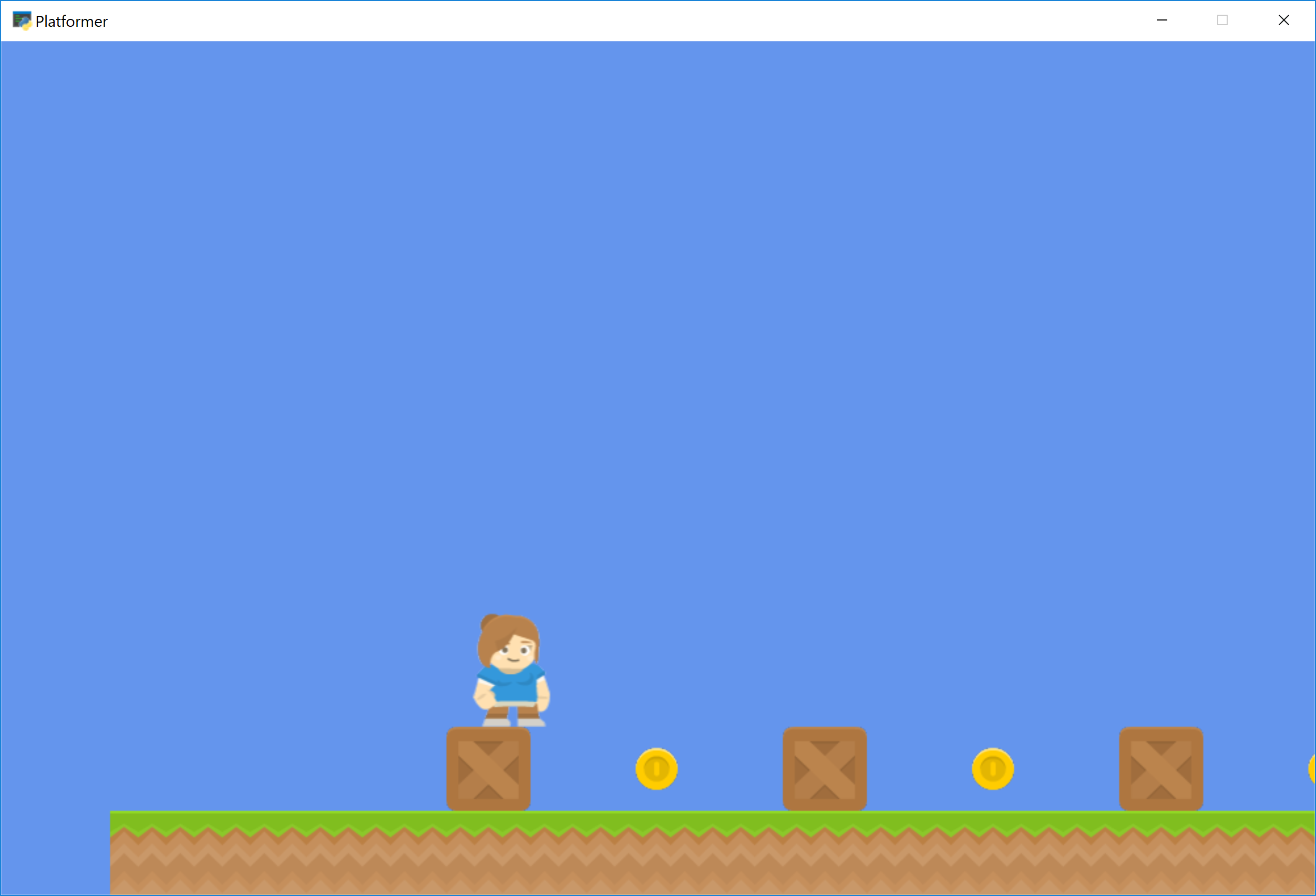
The code below adds coins that we can collect. It also adds a sound to be played when the user hits a coin, or presses the jump button.
We check to see if the user hits a coin by the arcade.check_for_collision_with_list
function. Just pass the player sprite, along with a SpriteList that holds
the coins. The function returns a list of coins in contact with the player sprite.
If no coins are in contact, the list is empty.
The method Sprite.remove_from_sprite_lists will remove that sprite from all
lists, and effectively the game.
Notice that any transparent “white-space” around the image counts as the hitbox. You can trim the space in a graphics editor, or in the second section, we’ll show you how to specify the hitbox.
  1"""
  2Platformer Game
  3"""
  4import arcade
  5
  6# Constants
  7SCREEN_WIDTH = 1000
  8SCREEN_HEIGHT = 650
  9SCREEN_TITLE = "Platformer"
 10
 11# Constants used to scale our sprites from their original size
 12CHARACTER_SCALING = 1
 13TILE_SCALING = 0.5
 14COIN_SCALING = 0.5
 15
 16# Movement speed of player, in pixels per frame
 17PLAYER_MOVEMENT_SPEED = 5
 18GRAVITY = 1
 19PLAYER_JUMP_SPEED = 20
 20
 21# How many pixels to keep as a minimum margin between the character
 22# and the edge of the screen.
 23LEFT_VIEWPORT_MARGIN = 250
 24RIGHT_VIEWPORT_MARGIN = 250
 25BOTTOM_VIEWPORT_MARGIN = 50
 26TOP_VIEWPORT_MARGIN = 100
 27
 28
 29class MyGame(arcade.Window):
 30    """
 31    Main application class.
 32    """
 33
 34    def __init__(self):
 35
 36        # Call the parent class and set up the window
 37        super().__init__(SCREEN_WIDTH, SCREEN_HEIGHT, SCREEN_TITLE)
 38
 39        # These are 'lists' that keep track of our sprites. Each sprite should
 40        # go into a list.
 41        self.coin_list = None
 42        self.wall_list = None
 43        self.player_list = None
 44
 45        # Separate variable that holds the player sprite
 46        self.player_sprite = None
 47
 48        # Our physics engine
 49        self.physics_engine = None
 50
 51        # Used to keep track of our scrolling
 52        self.view_bottom = 0
 53        self.view_left = 0
 54
 55        # Load sounds
 56        self.collect_coin_sound = arcade.load_sound(":resources:sounds/coin1.wav")
 57        self.jump_sound = arcade.load_sound(":resources:sounds/jump1.wav")
 58
 59        arcade.set_background_color(arcade.csscolor.CORNFLOWER_BLUE)
 60
 61    def setup(self):
 62        """ Set up the game here. Call this function to restart the game. """
 63
 64        # Used to keep track of our scrolling
 65        self.view_bottom = 0
 66        self.view_left = 0
 67
 68        # Create the Sprite lists
 69        self.player_list = arcade.SpriteList()
 70        self.wall_list = arcade.SpriteList()
 71        self.coin_list = arcade.SpriteList()
 72
 73        # Set up the player, specifically placing it at these coordinates.
 74        image_source = ":resources:images/animated_characters/female_adventurer/femaleAdventurer_idle.png"
 75        self.player_sprite = arcade.Sprite(image_source, CHARACTER_SCALING)
 76        self.player_sprite.center_x = 64
 77        self.player_sprite.center_y = 128
 78        self.player_list.append(self.player_sprite)
 79
 80        # Create the ground
 81        # This shows using a loop to place multiple sprites horizontally
 82        for x in range(0, 1250, 64):
 83            wall = arcade.Sprite(":resources:images/tiles/grassMid.png", TILE_SCALING)
 84            wall.center_x = x
 85            wall.center_y = 32
 86            self.wall_list.append(wall)
 87
 88        # Put some crates on the ground
 89        # This shows using a coordinate list to place sprites
 90        coordinate_list = [[512, 96],
 91                           [256, 96],
 92                           [768, 96]]
 93
 94        for coordinate in coordinate_list:
 95            # Add a crate on the ground
 96            wall = arcade.Sprite(":resources:images/tiles/boxCrate_double.png", TILE_SCALING)
 97            wall.position = coordinate
 98            self.wall_list.append(wall)
 99
100        # Use a loop to place some coins for our character to pick up
101        for x in range(128, 1250, 256):
102            coin = arcade.Sprite(":resources:images/items/coinGold.png", COIN_SCALING)
103            coin.center_x = x
104            coin.center_y = 96
105            self.coin_list.append(coin)
106
107        # Create the 'physics engine'
108        self.physics_engine = arcade.PhysicsEnginePlatformer(self.player_sprite,
109                                                             self.wall_list,
110                                                             GRAVITY)
111
112    def on_draw(self):
113        """ Render the screen. """
114
115        # Clear the screen to the background color
116        arcade.start_render()
117
118        # Draw our sprites
119        self.wall_list.draw()
120        self.coin_list.draw()
121        self.player_list.draw()
122
123    def on_key_press(self, key, modifiers):
124        """Called whenever a key is pressed. """
125
126        if key == arcade.key.UP or key == arcade.key.W:
127            if self.physics_engine.can_jump():
128                self.player_sprite.change_y = PLAYER_JUMP_SPEED
129                arcade.play_sound(self.jump_sound)
130        elif key == arcade.key.LEFT or key == arcade.key.A:
131            self.player_sprite.change_x = -PLAYER_MOVEMENT_SPEED
132        elif key == arcade.key.RIGHT or key == arcade.key.D:
133            self.player_sprite.change_x = PLAYER_MOVEMENT_SPEED
134
135    def on_key_release(self, key, modifiers):
136        """Called when the user releases a key. """
137
138        if key == arcade.key.LEFT or key == arcade.key.A:
139            self.player_sprite.change_x = 0
140        elif key == arcade.key.RIGHT or key == arcade.key.D:
141            self.player_sprite.change_x = 0
142
143    def update(self, delta_time):
144        """ Movement and game logic """
145
146        # Move the player with the physics engine
147        self.physics_engine.update()
148
149        # See if we hit any coins
150        coin_hit_list = arcade.check_for_collision_with_list(self.player_sprite,
151                                                             self.coin_list)
152
153        # Loop through each coin we hit (if any) and remove it
154        for coin in coin_hit_list:
155            # Remove the coin
156            coin.remove_from_sprite_lists()
157            # Play a sound
158            arcade.play_sound(self.collect_coin_sound)
159
160        # --- Manage Scrolling ---
161
162        # Track if we need to change the viewport
163
164        changed = False
165
166        # Scroll left
167        left_boundary = self.view_left + LEFT_VIEWPORT_MARGIN
168        if self.player_sprite.left < left_boundary:
169            self.view_left -= left_boundary - self.player_sprite.left
170            changed = True
171
172        # Scroll right
173        right_boundary = self.view_left + SCREEN_WIDTH - RIGHT_VIEWPORT_MARGIN
174        if self.player_sprite.right > right_boundary:
175            self.view_left += self.player_sprite.right - right_boundary
176            changed = True
177
178        # Scroll up
179        top_boundary = self.view_bottom + SCREEN_HEIGHT - TOP_VIEWPORT_MARGIN
180        if self.player_sprite.top > top_boundary:
181            self.view_bottom += self.player_sprite.top - top_boundary
182            changed = True
183
184        # Scroll down
185        bottom_boundary = self.view_bottom + BOTTOM_VIEWPORT_MARGIN
186        if self.player_sprite.bottom < bottom_boundary:
187            self.view_bottom -= bottom_boundary - self.player_sprite.bottom
188            changed = True
189
190        if changed:
191            # Only scroll to integers. Otherwise we end up with pixels that
192            # don't line up on the screen
193            self.view_bottom = int(self.view_bottom)
194            self.view_left = int(self.view_left)
195
196            # Do the scrolling
197            arcade.set_viewport(self.view_left,
198                                SCREEN_WIDTH + self.view_left,
199                                self.view_bottom,
200                                SCREEN_HEIGHT + self.view_bottom)
201
202
203def main():
204    """ Main method """
205    window = MyGame()
206    window.setup()
207    arcade.run()
208
209
210if __name__ == "__main__":
211    main()
Note
Spend time placing the coins where you would like them. If you have extra time, try adding more than just coins. Also add gems or keys from the graphics provided.
You could also subclass the coin sprite and add an attribute for a score value. Then you could have coins worth one point, and gems worth 5, 10, and 15 points.