Step 7 Python#
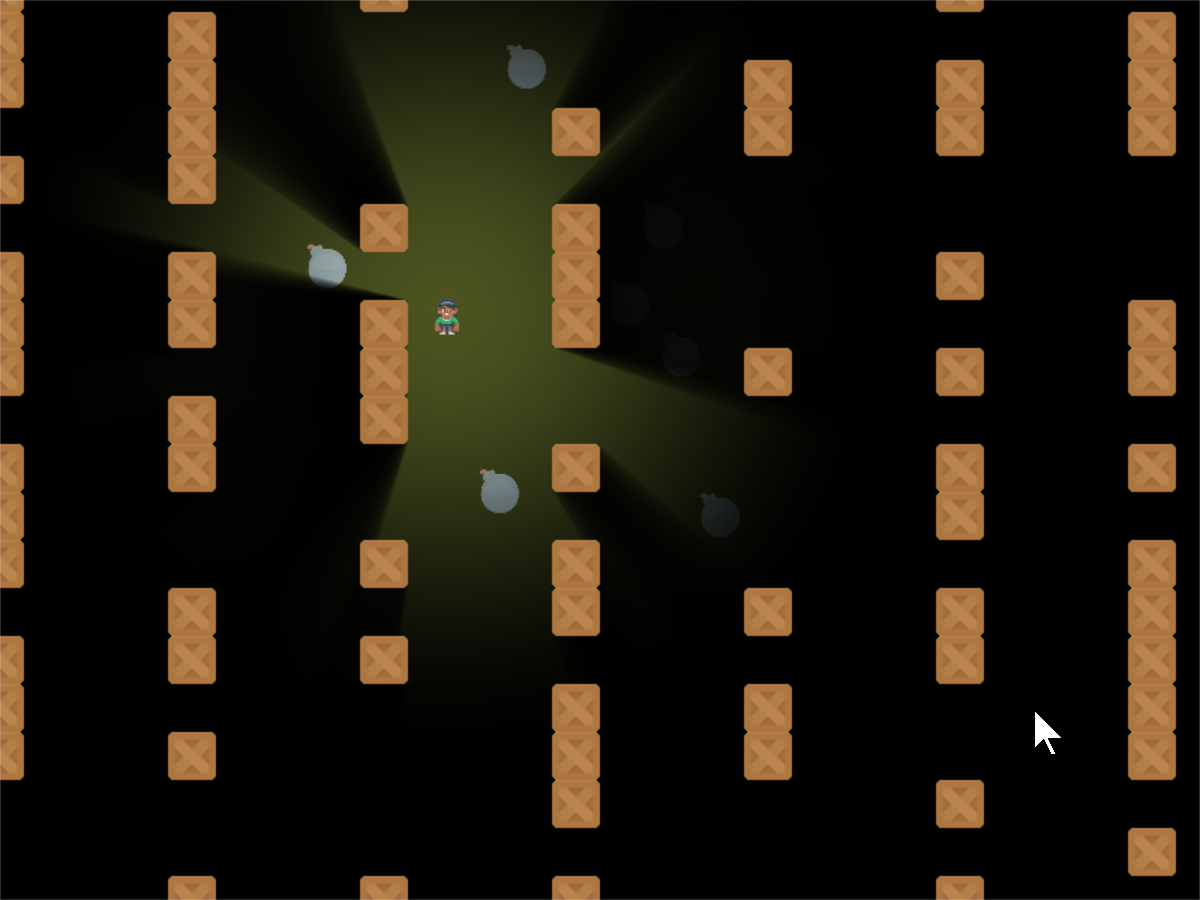
step_07.py#
1 2 3 4 5 6 7 8 9 10 11 12 13 14 15 16 17 18 19 20 21 22 23 24 25 26 27 28 29 30 31 32 33 34 35 36 37 38 39 40 41 42 43 44 45 46 47 48 49 50 51 52 53 54 55 56 57 58 59 60 61 62 63 64 65 66 67 68 69 70 71 72 73 74 75 76 77 78 79 80 81 82 83 84 85 86 87 88 89 90 91 92 93 94 95 96 97 98 99 100 101 102 103 104 105 106 107 108 109 110 111 112 113 114 115 116 117 118 119 120 121 122 123 124 125 126 127 128 129 130 131 132 133 134 135 136 137 138 139 140 141 142 143 144 145 146 147 148 149 150 151 152 153 154 155 156 157 158 159 160 161 | import random from pathlib import Path from pyglet.math import Vec2 import arcade from arcade.experimental import Shadertoy # Do the math to figure out our screen dimensions SCREEN_WIDTH = 800 SCREEN_HEIGHT = 600 SCREEN_TITLE = "Ray-casting Demo" SPRITE_SCALING = 0.25 # How fast the camera pans to the player. 1.0 is instant. CAMERA_SPEED = 0.1 PLAYER_MOVEMENT_SPEED = 7 BOMB_COUNT = 70 PLAYING_FIELD_WIDTH = 1600 PLAYING_FIELD_HEIGHT = 1600 class MyGame(arcade.Window): def __init__(self, width, height, title): super().__init__(width, height, title, resizable=True) # The shader toy and 'channels' we'll be using self.shadertoy = None self.channel0 = None self.channel1 = None self.load_shader() # Sprites and sprite lists self.player_sprite = None self.wall_list = arcade.SpriteList() self.player_list = arcade.SpriteList() self.bomb_list = arcade.SpriteList() self.physics_engine = None self.generate_sprites() arcade.set_background_color(arcade.color.ARMY_GREEN) def load_shader(self): # Where is the shader file? Must be specified as a path. shader_file_path = Path("step_06.glsl") # Size of the window window_size = self.get_size() # Create the shader toy self.shadertoy = Shadertoy.create_from_file(window_size, shader_file_path) # Create the channels 0 and 1 frame buffers. # Make the buffer the size of the window, with 4 channels (RGBA) self.channel0 = self.shadertoy.ctx.framebuffer( color_attachments=[self.shadertoy.ctx.texture(window_size, components=4)] ) self.channel1 = self.shadertoy.ctx.framebuffer( color_attachments=[self.shadertoy.ctx.texture(window_size, components=4)] ) # Assign the frame buffers to the channels self.shadertoy.channel_0 = self.channel0.color_attachments[0] self.shadertoy.channel_1 = self.channel1.color_attachments[0] def generate_sprites(self): # -- Set up several columns of walls for x in range(0, PLAYING_FIELD_WIDTH, 128): for y in range(0, PLAYING_FIELD_HEIGHT, int(128 * SPRITE_SCALING)): # Randomly skip a box so the player can find a way through if random.randrange(2) > 0: wall = arcade.Sprite(":resources:images/tiles/boxCrate_double.png", SPRITE_SCALING) wall.center_x = x wall.center_y = y self.wall_list.append(wall) # -- Set some hidden bombs in the area for i in range(BOMB_COUNT): bomb = arcade.Sprite(":resources:images/tiles/bomb.png", 0.25) placed = False while not placed: bomb.center_x = random.randrange(PLAYING_FIELD_WIDTH) bomb.center_y = random.randrange(PLAYING_FIELD_HEIGHT) if not arcade.check_for_collision_with_list(bomb, self.wall_list): placed = True self.bomb_list.append(bomb) # Create the player self.player_sprite = arcade.Sprite(":resources:images/animated_characters/female_person/femalePerson_idle.png", scale=SPRITE_SCALING) self.player_sprite.center_x = 256 self.player_sprite.center_y = 512 self.player_list.append(self.player_sprite) # Physics engine, so we don't run into walls self.physics_engine = arcade.PhysicsEngineSimple(self.player_sprite, self.wall_list) def on_draw(self): # Select the channel 0 frame buffer to draw on self.channel0.use() self.channel0.clear() # Draw the walls self.wall_list.draw() self.channel1.use() self.channel1.clear() # Draw the bombs self.bomb_list.draw() # Select this window to draw on self.use() # Clear to background color self.clear() # Run the shader and render to the window self.shadertoy.program['lightPosition'] = self.player_sprite.position self.shadertoy.program['lightSize'] = 300 self.shadertoy.render() # Draw the walls self.wall_list.draw() # Draw the player self.player_list.draw() def on_key_press(self, key, modifiers): """Called whenever a key is pressed. """ if key == arcade.key.UP: self.player_sprite.change_y = PLAYER_MOVEMENT_SPEED elif key == arcade.key.DOWN: self.player_sprite.change_y = -PLAYER_MOVEMENT_SPEED elif key == arcade.key.LEFT: self.player_sprite.change_x = -PLAYER_MOVEMENT_SPEED elif key == arcade.key.RIGHT: self.player_sprite.change_x = PLAYER_MOVEMENT_SPEED def on_key_release(self, key, modifiers): """Called when the user releases a key. """ if key == arcade.key.UP or key == arcade.key.DOWN: self.player_sprite.change_y = 0 elif key == arcade.key.LEFT or key == arcade.key.RIGHT: self.player_sprite.change_x = 0 def on_update(self, delta_time): """ Movement and game logic """ # Call update on all sprites (The sprites don't do much in this # example though.) self.physics_engine.update() def on_resize(self, width: float, height: float): super().on_resize(width, height) self.shadertoy.resize((width, height)) if __name__ == "__main__": MyGame(SCREEN_WIDTH, SCREEN_HEIGHT, SCREEN_TITLE) arcade.run() |