Two Player Split Screen
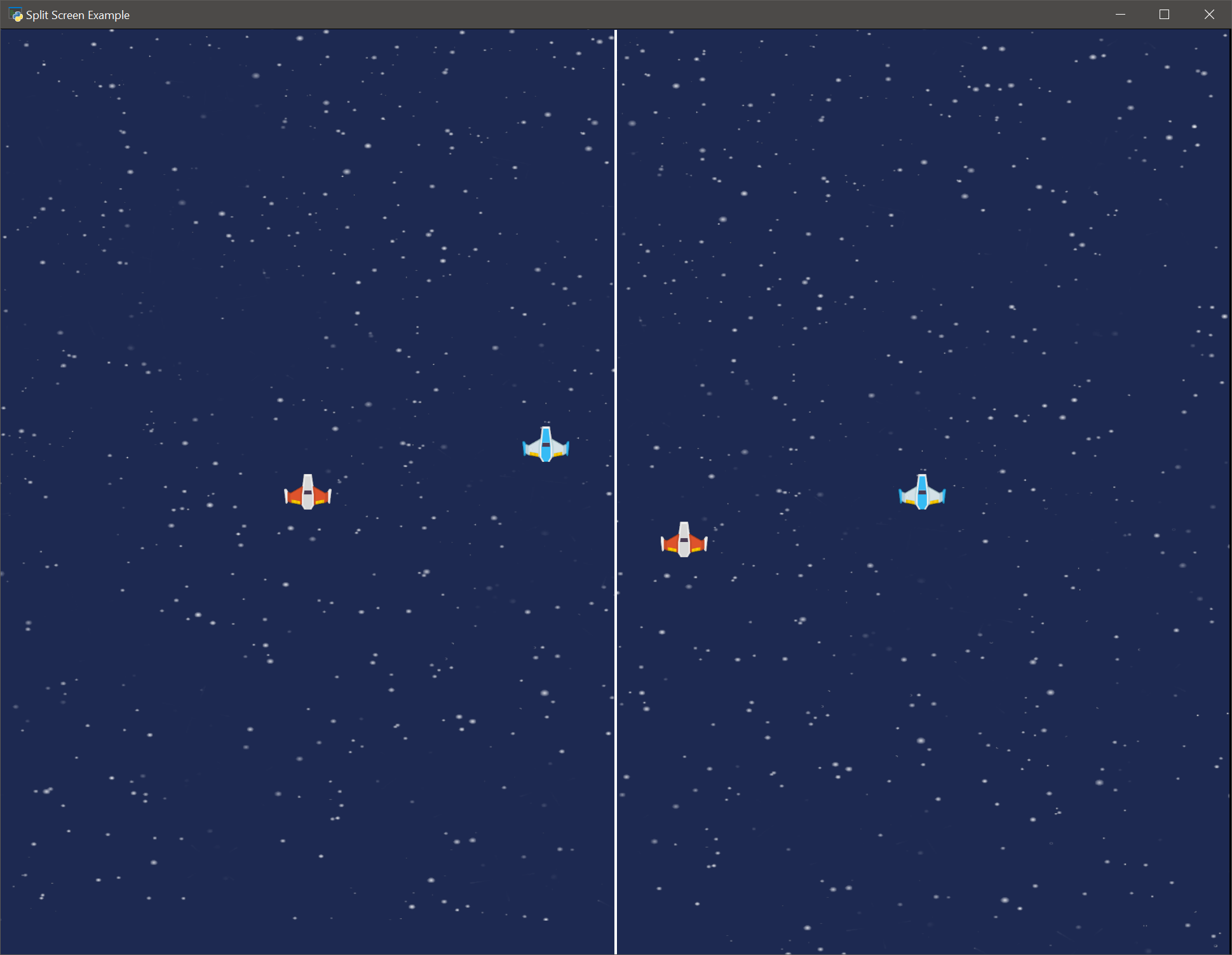
camera2d_splitscreen.py
  1"""
  2A simple example that demonstrates using multiple cameras to allow a split
  3screen using Arcade's 3.0 Camera2D.
  4
  5The left screen follows the player that is controlled by WASD, and the right
  6follows the player controlled by the keyboard.
  7
  8If Python and Arcade are installed, this example can be run
  9from the command line with:
 10python -m arcade.examples.camera2d_splitscreen
 11"""
 12
 13from typing import List, Optional, Tuple
 14
 15import pymunk
 16
 17import arcade
 18
 19
 20TITLE = "Split Screen Example"
 21SCREEN_WIDTH = 1400
 22SCREEN_HEIGHT = 1000
 23BACKGROUND_COLOR = arcade.color.SPACE_CADET
 24BACKGROUND_IMAGE = ":resources:images/backgrounds/stars.png"
 25
 26DEFAULT_DAMPING = 1.0
 27
 28GRAVITY = 0.0
 29SHIP_MASS = 1.0
 30SHIP_FRICTION = 0.0
 31SHIP_ELASTICITY = 0.1
 32
 33SHIP_FRICTION = 0.0
 34ROTATION_SPEED = 0.05
 35THRUSTER_FORCE = 200.0
 36
 37SHIP_SCALING = 0.5
 38
 39PLAYER_ONE = 0
 40PLAYER_TWO = 1
 41
 42CAMERA_ONE = 0
 43CAMERA_TWO = 1
 44
 45
 46class Player(arcade.Sprite):
 47    def __init__(self, main,
 48                 start_position: Tuple,
 49                 player_num: int):
 50        self.shape = None
 51
 52        if player_num == PLAYER_ONE:
 53            self.sprite_filename = ":resources:images/space_shooter/playerShip1_orange.png"
 54        else:
 55            self.sprite_filename = ":resources:images/space_shooter/playerShip1_blue.png"
 56
 57        self.player_num = player_num
 58        self.dx = 0.0
 59        self.dy = 0.0
 60        self.body : pymunk.Body
 61        self.start_position = start_position
 62        self.friction = SHIP_FRICTION
 63
 64        self.w_pressed = 0.0
 65        self.s_pressed = 0.0
 66        self.a_pressed = 0.0
 67        self.d_pressed = 0.0
 68
 69        self.left_pressed = 0.0
 70        self.right_pressed = 0.0
 71        self.up_pressed = 0.0
 72        self.down_pressed = 0.0
 73
 74        super().__init__(self.sprite_filename)
 75        self.position = start_position
 76        self.mass = SHIP_MASS
 77        self.friction = SHIP_FRICTION
 78        self.elasticity = SHIP_ELASTICITY
 79        self.texture = arcade.load_texture(self.sprite_filename,
 80                                           hit_box_algorithm=arcade.hitbox.PymunkHitBoxAlgorithm())
 81        self.main = main
 82        self.scale = SHIP_SCALING
 83
 84    def setup(self):
 85        self.body = self.main.physics_engine.get_physics_object(self).body
 86        self.shape = self.main.physics_engine.get_physics_object(self).shape
 87
 88    def apply_angle_damping(self):
 89        self.body.angular_velocity /= 1.05
 90
 91    def update(self, delta_time: float = 1/60):
 92        super().update(delta_time)
 93
 94        if self.player_num == PLAYER_ONE:
 95            self.dx = self.a_pressed + self.d_pressed
 96            self.dy = self.w_pressed + self.s_pressed
 97
 98        elif self.player_num == PLAYER_TWO:
 99            self.dx = self.right_pressed + self.left_pressed
100            self.dy = self.up_pressed + self.down_pressed
101
102        self.body.apply_force_at_world_point((self.dx, -self.dy), (self.center_x, self.center_y))
103
104    def on_key_press(self, key: int, modifiers: int):
105        if key == arcade.key.W:
106            self.w_pressed = -THRUSTER_FORCE
107        elif key == arcade.key.S:
108            self.s_pressed = THRUSTER_FORCE
109        elif key == arcade.key.A:
110            self.a_pressed = -THRUSTER_FORCE
111        elif key == arcade.key.D:
112            self.d_pressed = THRUSTER_FORCE
113        elif key == arcade.key.LEFT:
114            self.left_pressed = -THRUSTER_FORCE
115        elif key == arcade.key.RIGHT:
116            self.right_pressed = THRUSTER_FORCE
117        elif key == arcade.key.UP:
118            self.up_pressed = -THRUSTER_FORCE
119        elif key == arcade.key.DOWN:
120            self.down_pressed = THRUSTER_FORCE
121
122    def on_key_release(self, key: int, modifiers: int):
123        if key == arcade.key.W:
124            self.w_pressed = 0.0
125        elif key == arcade.key.S:
126            self.s_pressed = 0.0
127        elif key == arcade.key.A:
128            self.a_pressed = 0.0
129        elif key == arcade.key.D:
130            self.d_pressed = 0.0
131        elif key == arcade.key.LEFT:
132            self.left_pressed = 0.0
133        elif key == arcade.key.RIGHT:
134            self.right_pressed = 0.0
135        elif key == arcade.key.UP:
136            self.up_pressed = 0.0
137        elif key == arcade.key.DOWN:
138            self.down_pressed = 0.0
139
140
141class Game(arcade.Window):
142    def __init__(self):
143
144        self.screen_width: int = SCREEN_WIDTH
145        self.screen_height: int = SCREEN_HEIGHT
146
147        super().__init__(self.screen_width,
148                         self.screen_height,
149                         TITLE,
150                         resizable=True)
151        arcade.set_background_color(BACKGROUND_COLOR)
152
153        self.background_image: str = BACKGROUND_IMAGE
154        self.physics_engine: arcade.PymunkPhysicsEngine
155
156        self.players: arcade.SpriteList
157        self.players_list = []
158
159        self.cameras: List[arcade.Camera2D] = []
160        self.divider: arcade.SpriteList
161
162    def setup(self):
163        self.setup_spritelists()
164        self.setup_physics_engine()
165        self.setup_players()
166        self.setup_players_cameras()
167        self.setup_divider()
168        self.background = arcade.load_texture(self.background_image)
169
170    def setup_divider(self):
171        # It is helpful to have a divider, else the area between
172        # the two splits can be hard to see.
173        self.divider = arcade.SpriteList()
174        self.divider_sprite = arcade.sprite.SpriteSolidColor(
175            center_x = self.screen_width / 2,
176            center_y = self.screen_height / 2,
177            width=3,
178            height=self.screen_height,
179            color=arcade.color.WHITE
180        )
181        self.divider.append(self.divider_sprite)
182
183    def setup_spritelists(self):
184        self.players = arcade.SpriteList()
185
186    def setup_physics_engine(self):
187        self.physics_engine = arcade.PymunkPhysicsEngine(damping=DEFAULT_DAMPING,
188                                                         gravity=(0, 0))
189
190    def setup_players(self):
191        self.players.append(Player(self,
192                                   (500, 450),
193                                   PLAYER_ONE))
194        self.players.append(Player(self,
195                                   (750, 500),
196                                   PLAYER_TWO))
197
198        self.players_list = [self.players[PLAYER_ONE], self.players[PLAYER_TWO]]
199
200        self.physics_engine.add_sprite(self.players[PLAYER_ONE],
201                                       friction=self.players[PLAYER_ONE].friction,
202                                       elasticity=self.players[PLAYER_ONE].elasticity,
203                                       mass=self.players[PLAYER_ONE].mass,
204                                       moment_of_inertia=arcade.PymunkPhysicsEngine.MOMENT_INF,
205                                       collision_type="SHIP")
206
207        self.physics_engine.add_sprite(self.players[PLAYER_TWO],
208                                       friction=self.players[PLAYER_TWO].friction,
209                                       elasticity=self.players[PLAYER_TWO].elasticity,
210                                       mass=self.players[PLAYER_TWO].mass,
211                                       moment_of_inertia=arcade.PymunkPhysicsEngine.MOMENT_INF,
212                                       collision_type="SHIP")
213
214        for player in self.players:
215            player.setup()
216
217    def setup_players_cameras(self):
218        half_width = self.screen_width // 2
219
220        # We will make two cameras for each of our players.
221        player_one_camera = arcade.camera.Camera2D()
222        player_two_camera = arcade.camera.Camera2D()
223
224        # We can adjust each camera's viewport to create our split screens
225        player_one_camera.viewport = arcade.LBWH(0, 0, half_width, self.screen_height)
226        player_two_camera.viewport = arcade.LBWH(half_width, 0, half_width, self.screen_height)
227
228        # Calling equalise will equalise/equalize the Camera's projection
229        # to match the viewport. If we don't call equalise, proportions
230        # of our sprites can appear off.
231        player_one_camera.equalize()
232        player_two_camera.equalize()
233
234        # Save a list of our cameras for later use
235        self.cameras.append(player_one_camera)
236        self.cameras.append(player_two_camera)
237
238        self.center_camera_on_player(PLAYER_ONE)
239        self.center_camera_on_player(PLAYER_TWO)
240
241    def on_key_press(self, key: int, modifiers: int):
242        for player in self.players:
243            player.on_key_press(key, modifiers)
244
245        if key == arcade.key.MINUS:
246            self.zoom_cameras_out()
247        elif key == arcade.key.EQUAL:
248            self.zoom_cameras_in()
249
250    def on_key_release(self, key: int, modifers: int):
251        for player in self.players:
252            player.on_key_release(key, modifers)
253
254    def zoom_cameras_out(self):
255        for camera in self.cameras:
256            camera.zoom -= 0.1
257
258    def zoom_cameras_in(self):
259        for camera in self.cameras:
260            camera.zoom += 0.1
261
262    def center_camera_on_player(self, player_num):
263        self.cameras[player_num].position = (self.players_list[player_num].center_x,
264                                             self.players_list[player_num].center_y)
265
266    def on_update(self, delta_time: float):
267        self.players.update(delta_time)
268        self.physics_engine.step()
269        for player in range(len(self.players_list)):
270            # After the player moves, center the camera on the player.
271            self.center_camera_on_player(player)
272
273    def on_draw(self):
274        # Loop through our cameras, and then draw our objects.
275        #
276        # If an object should be drawn on both splits, we will
277        # need to draw it for each camera, thus the draw functions
278        # will be called twice (because of our loop).
279        #
280        # However, if desired, we could draw elements specific to
281        # each camera, like a player HUD.
282        for camera in range(len(self.cameras)):
283            # Activate each players camera, clear it, then draw
284            # the things we want to display on it.
285            self.cameras[camera].use()
286            self.clear()
287
288            # We want both players to appear in each splitscreen,
289            # so draw them for each camera.
290            self.players.draw()
291
292            # Likewise, we want the background to appear on
293            # both splitscreens.
294            arcade.draw_texture_rect(
295                self.background,
296                arcade.LBWH(0, 0, self.screen_width, self.screen_height)
297            )
298
299        # The default_camera is a property of arcade.Window and we
300        # can use it do draw our divider, or other shared elements,
301        # such as a score, or other GUIs.
302        self.default_camera.use()
303        self.divider.draw()
304
305    def on_resize(self, width: float, height: float):
306        # We can easily resize the window with split screens by adjusting
307        # the viewport in a similar manner to how we created them. Just
308        # remember to call equalise!
309        half_width = width // 2
310
311        self.cameras[PLAYER_ONE].viewport = arcade.LBWH(0, 0, half_width, height)
312        self.cameras[PLAYER_TWO].viewport = arcade.LBWH(half_width, 0, half_width, height)
313        self.cameras[PLAYER_ONE].equalize()
314        self.cameras[PLAYER_TWO].equalize()
315
316        # Our divider sprite location will need to be adjusted as
317        # we used the screen's width and height to set it's location
318        # earlier
319        self.divider_sprite.height = height
320        self.divider_sprite.center_x = width / 2
321        self.divider_sprite.center_y = height / 2
322
323
324if __name__ == "__main__":
325    window = Game()
326    window.setup()
327    arcade.run()