GUI Widget Gallery
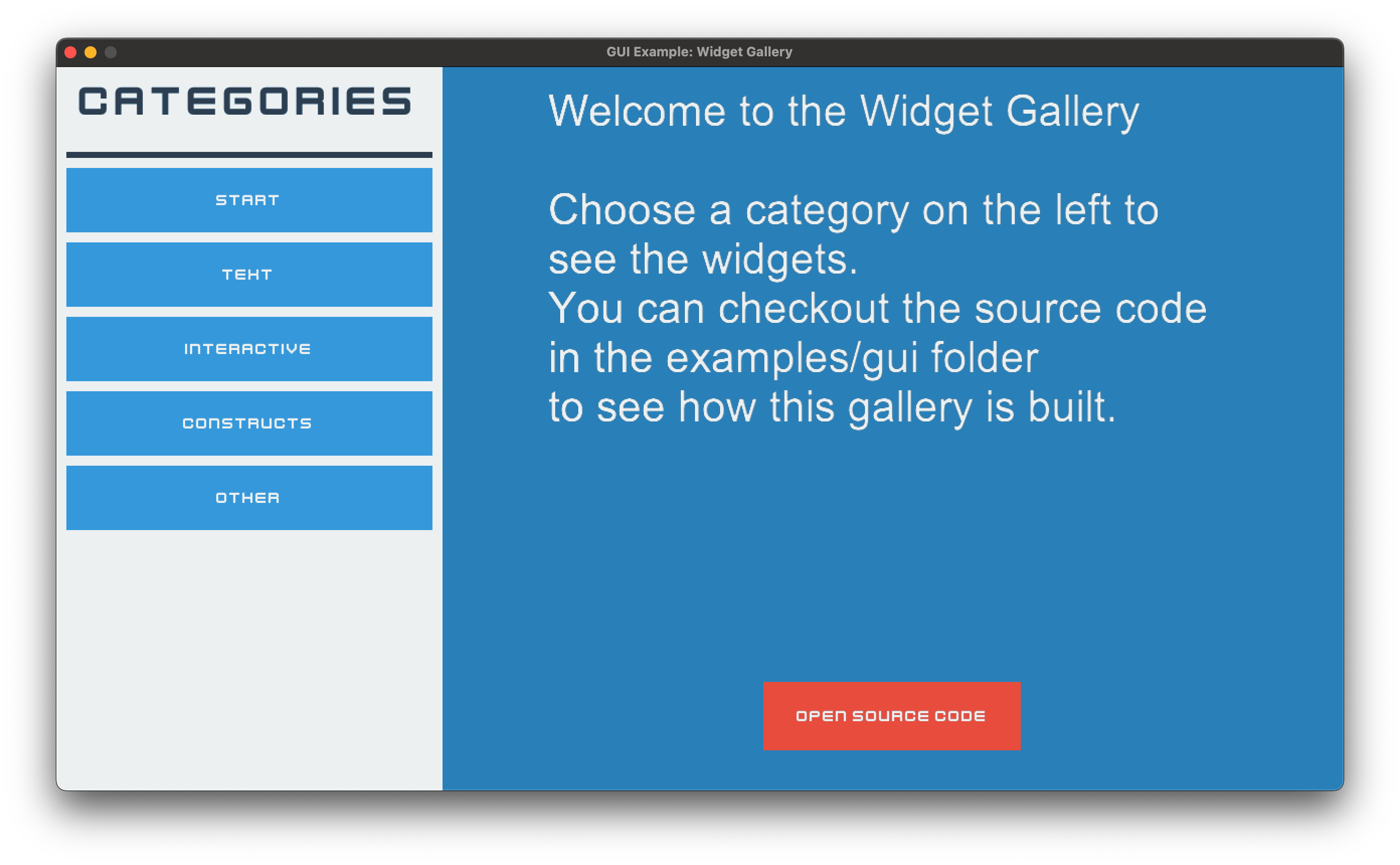
2_widgets.py
1"""An overview of all included widgets.
2
3See the other GUI examples for more indepth information about specific widgets.
4
5If Arcade and Python are properly installed, you can run this example with:
6python -m arcade.examples.gui.2_widgets
7"""
8
9import textwrap
10from copy import deepcopy
11
12import arcade
13from arcade.gui import (
14 NinePatchTexture,
15 UIAnchorLayout,
16 UIBoxLayout,
17 UIButtonRow,
18 UIDropdown,
19 UIDummy,
20 UIFlatButton,
21 UIImage,
22 UIInputText,
23 UILabel,
24 UIManager,
25 UIMessageBox,
26 UIOnActionEvent,
27 UIOnChangeEvent,
28 UISlider,
29 UISpace,
30 UISpriteWidget,
31 UITextArea,
32 UITextureButton,
33 UITextureSlider,
34 UITextureToggle,
35 UIView,
36)
37from arcade.gui.experimental import UIPasswordInput
38
39# Load system fonts
40arcade.resources.load_kenney_fonts()
41
42DEFAULT_FONT = ("Kenney Future", "arial")
43DETAILS_FONT = ("arial", "Kenney Future Narrow")
44
45# Preload textures, because they are mostly used multiple times, so they are not
46# loaded multiple times
47TEX_SCROLL_DOWN = arcade.load_texture(":resources:gui_basic_assets/scroll/indicator_down.png")
48TEX_SCROLL_UP = arcade.load_texture(":resources:gui_basic_assets/scroll/indicator_up.png")
49
50TEX_RED_BUTTON_NORMAL = arcade.load_texture(":resources:gui_basic_assets/button/red_normal.png")
51TEX_RED_BUTTON_HOVER = arcade.load_texture(":resources:gui_basic_assets/button/red_hover.png")
52TEX_RED_BUTTON_PRESS = arcade.load_texture(":resources:gui_basic_assets/button/red_press.png")
53TEX_RED_BUTTON_DISABLE = arcade.load_texture(":resources:gui_basic_assets/button/red_disabled.png")
54
55TEX_TOGGLE_RED = arcade.load_texture(":resources:gui_basic_assets/toggle/red.png")
56TEX_TOGGLE_GREEN = arcade.load_texture(":resources:gui_basic_assets/toggle/green.png")
57
58TEX_CHECKBOX_CHECKED = arcade.load_texture(":resources:gui_basic_assets/checkbox/blue_check.png")
59TEX_CHECKBOX_UNCHECKED = arcade.load_texture(":resources:gui_basic_assets/checkbox/empty.png")
60
61TEX_SLIDER_THUMB_BLUE = arcade.load_texture(":resources:gui_basic_assets/slider/thumb_blue.png")
62TEX_SLIDER_TRACK_BLUE = arcade.load_texture(":resources:gui_basic_assets/slider/track_blue.png")
63TEX_SLIDER_THUMB_RED = arcade.load_texture(":resources:gui_basic_assets/slider/thumb_red.png")
64TEX_SLIDER_TRACK_RED = arcade.load_texture(":resources:gui_basic_assets/slider/track_red.png")
65TEX_SLIDER_THUMB_GREEN = arcade.load_texture(":resources:gui_basic_assets/slider/thumb_green.png")
66TEX_SLIDER_TRACK_GREEN = arcade.load_texture(":resources:gui_basic_assets/slider/track_green.png")
67
68TEX_NINEPATCH_BASE = arcade.load_texture(":resources:gui_basic_assets/window/grey_panel.png")
69
70TEX_ARCADE_LOGO = arcade.load_texture(":resources:/logo.png")
71
72# Load animation for the sprite widget
73frame_textures = []
74for i in range(8):
75 tex = arcade.load_texture(
76 f":resources:images/animated_characters/female_adventurer/femaleAdventurer_walk{i}.png"
77 )
78 frame_textures.append(tex)
79
80TEX_ANIMATED_CHARACTER = arcade.TextureAnimation(
81 [arcade.TextureKeyframe(frame) for frame in frame_textures]
82)
83
84TEXT_WIDGET_EXPLANATION = textwrap.dedent("""
85Arcade GUI provides three types of text widgets:
86
87
88- {bold True}UILabel{bold False}:
89A simple text widget that can be used to display text.
90
91- {bold True}UIInputText{bold False}:
92A text widget that can be used to get text input from the user.
93
94- {bold True}UITextArea{bold False}:
95A text widget that can be used to display text that is too long for a label.
96
97
98This example shows how to use all three types of text widgets.
99
100
101A few hints regarding the usage of the text widgets:
102
103
104{bold True}UILabel{bold False}:
105
106If you want to display frequently changing text,
107setting a background color will improve performance.
108
109
110{bold True}UIInputText{bold False}:
111
112UIInputText dispatches an event on_change, when the text changes.
113
114
115{bold True}UITextArea{bold False}:
116
117While the widget supports scrolling, there is no scrollbar provided yet.
118Users might oversee content.
119
120In addition UITextArea supports different text styles,
121which relate to Pyglet FormattedDocument.
122
123"PLAIN" - Plain text.
124
125"ATTRIBUTED" - Attributed text following the Pyglet attributed text style.
126
127"HTML" - Allows to use HTML tags for formatting.
128
129""").strip()
130
131
132class ScrollableTextArea(UITextArea, UIAnchorLayout):
133 """This widget is a text area that can be scrolled, like a UITextLayout, but shows indicator,
134 that the text can be scrolled."""
135
136 def __init__(self, **kwargs):
137 super().__init__(**kwargs)
138
139 indicator_size = 22
140 self._down_indicator = UIImage(
141 texture=TEX_SCROLL_DOWN, size_hint=None, width=indicator_size, height=indicator_size
142 )
143 self._down_indicator.visible = False
144 self.add(self._down_indicator, anchor_x="right", anchor_y="bottom", align_x=3)
145
146 self._up_indicator = UIImage(
147 texture=TEX_SCROLL_UP, size_hint=None, width=indicator_size, height=indicator_size
148 )
149 self._up_indicator.visible = False
150 self.add(self._up_indicator, anchor_x="right", anchor_y="top", align_x=3)
151
152 def on_update(self, dt):
153 self._up_indicator.visible = self.layout.view_y < 0
154 self._down_indicator.visible = (
155 abs(self.layout.view_y) < self.layout.content_height - self.layout.height
156 )
157
158
159class GalleryView(UIView):
160 def __init__(self):
161 super().__init__()
162 self.background_color = arcade.uicolor.BLUE_BELIZE_HOLE
163
164 root = self.add_widget(UIAnchorLayout())
165
166 # Setup side navigation
167 nav_side = UIButtonRow(vertical=True, size_hint=(0.3, 1))
168 nav_side.add(
169 UILabel(
170 "Categories",
171 font_name=DEFAULT_FONT,
172 font_size=32,
173 text_color=arcade.uicolor.DARK_BLUE_MIDNIGHT_BLUE,
174 size_hint=(1, 0.1),
175 align="center",
176 )
177 )
178 nav_side.add(UISpace(size_hint=(1, 0.01), color=arcade.uicolor.DARK_BLUE_MIDNIGHT_BLUE))
179
180 nav_side.with_padding(all=10)
181 nav_side.with_background(color=arcade.uicolor.WHITE_CLOUDS)
182 nav_side.add_button("Start", style=UIFlatButton.STYLE_BLUE, size_hint=(1, 0.1))
183 nav_side.add_button("Text", style=UIFlatButton.STYLE_BLUE, size_hint=(1, 0.1))
184 nav_side.add_button("Interactive", style=UIFlatButton.STYLE_BLUE, size_hint=(1, 0.1))
185 nav_side.add_button("Constructs", style=UIFlatButton.STYLE_BLUE, size_hint=(1, 0.1))
186 nav_side.add_button("Other", style=UIFlatButton.STYLE_BLUE, size_hint=(1, 0.1))
187 root.add(nav_side, anchor_x="left", anchor_y="top")
188
189 @nav_side.event("on_action")
190 def on_action(event: UIOnActionEvent):
191 if event.action == "Start":
192 self._show_start_widgets()
193 elif event.action == "Text":
194 self._show_text_widgets()
195 elif event.action == "Interactive":
196 self._show_interactive_widgets()
197 elif event.action == "Constructs":
198 self._show_construct_widgets()
199 elif event.action == "Other":
200 self._show_other_widgets()
201
202 # Setup content to show widgets in
203
204 self._body = UIAnchorLayout(size_hint=(0.7, 1))
205 self._body.with_padding(all=20)
206 root.add(self._body, anchor_x="right", anchor_y="top")
207
208 # init start widgets
209 self._show_start_widgets()
210
211 def _show_start_widgets(self):
212 """Show a short introduction message."""
213 self._body.clear()
214 self._body.add(
215 UITextArea(
216 text=textwrap.dedent("""
217 Welcome to the Widget Gallery
218
219 Choose a category on the left to see the widgets.
220 You can checkout the source code in the examples/gui folder
221 to see how this gallery is built.
222 """).strip(),
223 font_name=DETAILS_FONT,
224 font_size=32,
225 text_color=arcade.uicolor.WHITE,
226 size_hint=(0.8, 0.8),
227 ),
228 anchor_y="top",
229 )
230 open_sourcecode = self._body.add(
231 UIFlatButton(
232 text="Open Source Code", style=UIFlatButton.STYLE_RED, size_hint=(0.3, 0.1)
233 ),
234 anchor_y="bottom",
235 align_y=20,
236 )
237
238 @open_sourcecode.event("on_click")
239 def on_click(_):
240 """This will open the source code of this example on GitHub."""
241 import webbrowser
242
243 webbrowser.open(
244 "https://github.com/pythonarcade/arcade/tree/development/arcade/examples/gui"
245 )
246
247 def _show_text_widgets(self):
248 """Show the text widgets.
249
250 For this we clear the body and add the text widgets.
251
252 Featuring:
253 - UILabel
254 - UIInputText
255 - UITextArea
256 """
257
258 self._body.clear()
259
260 box = UIBoxLayout(vertical=True, size_hint=(1, 1), align="left", space_between=10)
261 self._body.add(box)
262 box.add(UILabel("Text Widgets", font_name=DEFAULT_FONT, font_size=32))
263 box.add(UISpace(size_hint=(1, 0.1)))
264
265 row_1 = UIBoxLayout(vertical=False, size_hint=(1, 0.1))
266 box.add(row_1)
267 row_1.add(UILabel("Username: ", font_name=DEFAULT_FONT, font_size=24))
268 name_input = row_1.add(
269 UIInputText(
270 width=400,
271 height=40,
272 font_name=DEFAULT_FONT,
273 font_size=24,
274 border_color=arcade.uicolor.GRAY_CONCRETE,
275 border_width=2,
276 )
277 )
278
279 row_2 = UIBoxLayout(vertical=False, size_hint=(1, 0.1))
280 box.add(row_2)
281 row_2.add(UILabel("Password: ", font_name=DEFAULT_FONT, font_size=24))
282 pw_input = row_2.add(
283 UIPasswordInput(
284 width=400,
285 height=40,
286 font_name=DEFAULT_FONT,
287 font_size=24,
288 border_color=arcade.uicolor.GRAY_CONCRETE,
289 border_width=2,
290 )
291 )
292
293 @pw_input.event("on_change")
294 def _(event: UIOnChangeEvent):
295 event.source.invalid = event.new_value != "arcade"
296
297 welcome_label = box.add(
298 UILabel("Nice to meet you ''", font_name=DEFAULT_FONT, font_size=24)
299 )
300
301 @name_input.event("on_change")
302 def _(event: UIOnChangeEvent):
303 welcome_label.text = f"Nice to meet you `{event.new_value}`"
304
305 box.add(UISpace(size_hint=(1, 0.3))) # Fill some of the left space
306
307 text_area = box.add(
308 ScrollableTextArea(
309 text=TEXT_WIDGET_EXPLANATION,
310 size_hint=(1, 0.9),
311 font_name=DETAILS_FONT,
312 font_size=16,
313 text_color=arcade.uicolor.WHITE,
314 document_mode="ATTRIBUTED",
315 )
316 )
317 text_area.with_padding(left=10, right=10)
318 text_area.with_border(color=arcade.uicolor.GRAY_CONCRETE, width=2)
319
320 def _show_interactive_widgets(self):
321 self._body.clear()
322 box = UIBoxLayout(vertical=True, size_hint=(1, 1), align="left", space_between=10)
323 self._body.add(box)
324 box.add(UILabel("Interactive Widgets", font_name=DEFAULT_FONT, font_size=32))
325 box.add(UISpace(size_hint=(1, 0.1)))
326
327 flat_row = UIBoxLayout(vertical=False, size_hint=(1, 0.1), space_between=10)
328 box.add(flat_row)
329
330 flat_row.add(
331 UIFlatButton(
332 text="UIFlatButton blue", style=UIFlatButton.STYLE_BLUE, size_hint=(0.3, 1)
333 )
334 )
335 flat_row.add(
336 UIFlatButton(text="UIFlatButton red", style=UIFlatButton.STYLE_RED, size_hint=(0.3, 1))
337 )
338 flat_row.add(
339 UIFlatButton(text="disabled", style=UIFlatButton.STYLE_BLUE, size_hint=(0.3, 1))
340 ).disabled = True
341
342 tex_row = UIBoxLayout(vertical=False, size_hint=(1, 0.1), space_between=10)
343 box.add(tex_row)
344 tex_row.add(
345 UITextureButton(
346 text="UITextureButton",
347 texture=TEX_RED_BUTTON_NORMAL,
348 texture_hovered=TEX_RED_BUTTON_HOVER,
349 texture_pressed=TEX_RED_BUTTON_PRESS,
350 texture_disabled=TEX_RED_BUTTON_DISABLE,
351 size_hint=(0.3, 1),
352 )
353 )
354
355 tex_row.add(UISpace(size_hint=(0.3, 1)))
356
357 tex_row.add(
358 UITextureButton(
359 text="disabled",
360 texture=TEX_RED_BUTTON_NORMAL,
361 texture_hovered=TEX_RED_BUTTON_HOVER,
362 texture_pressed=TEX_RED_BUTTON_PRESS,
363 texture_disabled=TEX_RED_BUTTON_DISABLE,
364 size_hint=(0.3, 1),
365 )
366 ).disabled = True
367
368 toggle_row = UIBoxLayout(vertical=False, size_hint=(1, 0.1), space_between=10)
369 box.add(toggle_row)
370 toggle_row.add(
371 UILabel("UITextureToggle", font_name=DETAILS_FONT, font_size=16, size_hint=(0.3, 0))
372 )
373 toggle_row.add(
374 UITextureToggle(
375 on_texture=TEX_TOGGLE_RED,
376 off_texture=TEX_TOGGLE_GREEN,
377 width=64,
378 height=32,
379 )
380 )
381 toggle_row.add(
382 UITextureToggle(
383 on_texture=TEX_CHECKBOX_CHECKED,
384 off_texture=TEX_CHECKBOX_UNCHECKED,
385 width=32,
386 height=32,
387 )
388 )
389
390 dropdown_row = UIBoxLayout(vertical=False, size_hint=(1, 0.1), space_between=10)
391 box.add(dropdown_row)
392 dropdown_row.add(
393 UILabel("UIDropdown", font_name=DETAILS_FONT, font_size=16, size_hint=(0.3, 0))
394 )
395 dropdown_row.add(
396 UIDropdown(
397 default="Option 1",
398 options=[f"Option {i}" for i in range(1, 16)],
399 show_scroll_bar=True,
400 )
401 )
402
403 slider_row = UIBoxLayout(vertical=False, size_hint=(1, 0.1), space_between=10)
404 box.add(slider_row)
405
406 slider_row.add(
407 UILabel(
408 "UISlider",
409 font_name=DETAILS_FONT,
410 font_size=16,
411 size_hint=(0.3, 0),
412 )
413 )
414 s1 = slider_row.add(UISlider(size_hint=(0.3, 1), step=1, style=UISlider.NO_STEP_STYLE))
415 s2 = slider_row.add(
416 UISlider(
417 size_hint=(0.3, 1),
418 step=5,
419 )
420 )
421 s3 = slider_row.add(
422 UISlider(
423 size_hint=(0.3, 1),
424 step=10,
425 )
426 )
427
428 @s1.event("on_change")
429 def _(event: UIOnChangeEvent):
430 s2.value = event.new_value
431 s3.value = event.new_value
432
433 @s2.event("on_change")
434 def _(event: UIOnChangeEvent):
435 s1.value = event.new_value
436 s3.value = event.new_value
437
438 @s3.event("on_change")
439 def _(event: UIOnChangeEvent):
440 s1.value = event.new_value
441 s2.value = event.new_value
442
443 tex_slider_row = UIBoxLayout(vertical=False, size_hint=(1, 0.1), space_between=10)
444 box.add(tex_slider_row)
445
446 tex_slider_row.add(
447 UILabel(
448 "UITextureSlider",
449 font_name=DETAILS_FONT,
450 font_size=16,
451 size_hint=(0.3, 0),
452 )
453 )
454
455 ts1 = tex_slider_row.add(
456 UITextureSlider(
457 thumb_texture=TEX_SLIDER_THUMB_BLUE,
458 track_texture=NinePatchTexture(10, 10, 10, 10, TEX_SLIDER_TRACK_BLUE),
459 size_hint=(0.3, None),
460 )
461 )
462
463 green_style = deepcopy(UITextureSlider.DEFAULT_STYLE)
464 green_style["normal"].filled_track = arcade.uicolor.GREEN_GREEN_SEA
465 green_style["hover"].filled_track = arcade.uicolor.GREEN_EMERALD
466 green_style["press"].filled_track = arcade.uicolor.GREEN_GREEN_SEA
467 ts2 = tex_slider_row.add(
468 UITextureSlider(
469 thumb_texture=TEX_SLIDER_THUMB_GREEN,
470 track_texture=NinePatchTexture(10, 10, 10, 10, TEX_SLIDER_TRACK_GREEN),
471 size_hint=(0.3, None),
472 style=green_style,
473 )
474 )
475
476 red_style = deepcopy(UITextureSlider.DEFAULT_STYLE)
477 red_style["normal"].filled_track = arcade.uicolor.RED_POMEGRANATE
478 red_style["hover"].filled_track = arcade.uicolor.RED_ALIZARIN
479 red_style["press"].filled_track = arcade.uicolor.RED_POMEGRANATE
480 ts3 = tex_slider_row.add(
481 UITextureSlider(
482 thumb_texture=TEX_SLIDER_THUMB_RED,
483 track_texture=NinePatchTexture(10, 10, 10, 10, TEX_SLIDER_TRACK_RED),
484 size_hint=(0.3, None),
485 style=red_style,
486 )
487 )
488
489 @ts1.event("on_change")
490 def _(event: UIOnChangeEvent):
491 ts2.value = event.new_value
492 ts3.value = event.new_value
493
494 @ts2.event("on_change")
495 def _(event: UIOnChangeEvent):
496 ts1.value = event.new_value
497 ts3.value = event.new_value
498
499 @ts3.event("on_change")
500 def _(event: UIOnChangeEvent):
501 ts1.value = event.new_value
502 ts2.value = event.new_value
503
504 box.add(UISpace(size_hint=(0.2, 0.1)))
505 text_area = box.add(
506 UITextArea(
507 text=textwrap.dedent("""
508 Interactive widgets are widgets that the user can interact with.
509 This includes buttons, toggles, sliders and more.
510
511 By subclassing UIInteractiveWidget you
512 can create your own interactive widgets.
513
514 For text input have a look at the text widgets.
515 """).strip(),
516 font_name=DETAILS_FONT,
517 font_size=16,
518 text_color=arcade.uicolor.WHITE,
519 size_hint=(1, 0.9),
520 )
521 )
522 text_area.with_padding(left=10, right=10)
523 text_area.with_border(color=arcade.uicolor.GRAY_CONCRETE, width=2)
524
525 def _show_construct_widgets(self):
526 self._body.clear()
527 box = UIBoxLayout(vertical=True, size_hint=(1, 1), align="left", space_between=10)
528 self._body.add(box)
529 box.add(UILabel("Constructs", font_name=DEFAULT_FONT, font_size=32))
530 box.add(UISpace(size_hint=(1, 0.1)))
531
532 message_row = UIBoxLayout(vertical=False, size_hint=(1, 0.1), space_between=10)
533 box.add(message_row)
534 message_row.add(
535 UILabel(
536 "UIMessageBox",
537 font_name=DETAILS_FONT,
538 font_size=16,
539 size_hint=(0.3, 0),
540 )
541 )
542 message_button = message_row.add(
543 UIFlatButton(
544 text="Show Message",
545 style=UIFlatButton.STYLE_BLUE,
546 size_hint=(0.3, 1),
547 )
548 )
549
550 @message_button.event("on_click")
551 def on_click(event):
552 self.ui.add(
553 UIMessageBox(
554 width=500,
555 height=350,
556 title="Message Box",
557 buttons=("Ok", "Cancel"),
558 message_text=textwrap.dedent("""
559 This is a message box.
560 It can be used to show messages to the user.
561
562 You can add buttons to it, to let the user choose an action.
563 """).strip(),
564 ),
565 layer=UIManager.OVERLAY_LAYER,
566 )
567
568 button_row = UIBoxLayout(vertical=False, size_hint=(1, 0.1), space_between=10)
569 box.add(button_row)
570 button_row.add(
571 UILabel(
572 "UIButtonRow",
573 font_name=DETAILS_FONT,
574 font_size=16,
575 size_hint=(0.3, 0),
576 )
577 )
578 buttons = button_row.add(
579 UIButtonRow(
580 text="Show Message",
581 style=UIFlatButton.STYLE_BLUE,
582 size_hint=(1, 0),
583 )
584 )
585 buttons.add_button("Default Style", size_hint=(1, None))
586 buttons.add_button("Red Style", style=UIFlatButton.STYLE_RED, size_hint=(1, None))
587 buttons.add_button("Blue Style", style=UIFlatButton.STYLE_BLUE, size_hint=(1, None))
588
589 # Constructs
590 # "UIButtonRow",
591
592 box.add(UISpace(size_hint=(0.2, 0.1)))
593 text_area = box.add(
594 UITextArea(
595 text=textwrap.dedent("""
596 Constructs are widgets that combine multiple widgets, to provide common functionality
597 within a simple widget.
598 Examples for this are message boxes or rows of buttons.
599 """).strip(),
600 font_name=DETAILS_FONT,
601 font_size=16,
602 text_color=arcade.uicolor.WHITE,
603 size_hint=(1, 0.5),
604 )
605 )
606 text_area.with_padding(left=10, right=10)
607 text_area.with_border(color=arcade.uicolor.GRAY_CONCRETE, width=2)
608
609 def _show_other_widgets(self):
610 self._body.clear()
611 box = UIBoxLayout(vertical=True, size_hint=(1, 1), align="left", space_between=10)
612 self._body.add(box)
613 box.add(UILabel("Other Widgets", font_name=DEFAULT_FONT, font_size=32))
614 box.add(UISpace(size_hint=(1, 0.1)))
615
616 image_row = box.add(UIBoxLayout(vertical=False, size_hint=(1, 0.1)))
617 image_row.add(UILabel("UIImage", font_name=DETAILS_FONT, font_size=16, size_hint=(0.3, 0)))
618 image_row.add(UIImage(texture=TEX_ARCADE_LOGO, width=64, height=64))
619
620 dummy_row = box.add(UIBoxLayout(vertical=False, size_hint=(1, 0.1)))
621 dummy_row.add(UILabel("UIDummy", font_name=DETAILS_FONT, font_size=16, size_hint=(0.3, 0)))
622 dummy_row.add(UIDummy(size_hint=(0.2, 1)))
623 dummy_row.add(UIDummy(size_hint=(0.2, 1)))
624 dummy_row.add(UIDummy(size_hint=(0.2, 1)))
625
626 sprite = arcade.TextureAnimationSprite(animation=TEX_ANIMATED_CHARACTER)
627 sprite.scale = 0.5
628 sprite_row = box.add(UIBoxLayout(vertical=False, size_hint=(1, 0.1)))
629 sprite_row.add(
630 UILabel("UISpriteWidget", font_name=DETAILS_FONT, font_size=16, size_hint=(0.3, 0))
631 )
632 sprite_row.add(UISpriteWidget(sprite=sprite, width=sprite.width, height=sprite.height))
633
634 box.add(UISpace(size_hint=(0.2, 0.1)))
635 text_area = box.add(
636 UITextArea(
637 text=textwrap.dedent("""
638 Arcade GUI provides also a few more widgets for special use cases.
639
640 - UIImage: A widget to display an image.
641 - UIDummy: Which can be used as a placeholder.
642 It renders a random color and changes it on click.
643 - UISpace: A widget that only takes up space.
644 But can also be used to add a colored space.
645 - UISpriteWidget: A widget that can display a sprite.
646
647 """).strip(),
648 font_name=DETAILS_FONT,
649 font_size=16,
650 text_color=arcade.uicolor.WHITE,
651 size_hint=(1, 0.9),
652 )
653 )
654 text_area.with_padding(left=10, right=10)
655 text_area.with_border(color=arcade.uicolor.GRAY_CONCRETE, width=2)
656
657
658def main():
659 window = arcade.Window(title="GUI Example: Widget Gallery")
660 window.show_view(GalleryView())
661 window.run()
662
663
664if __name__ == "__main__":
665 main()